

API tokens
API tokens let scripts and external tools act on your account through the REST API: automate deploys, manage instances, or wire up your own integrations. A token works like your login, so treat it like a password.
Where to find it
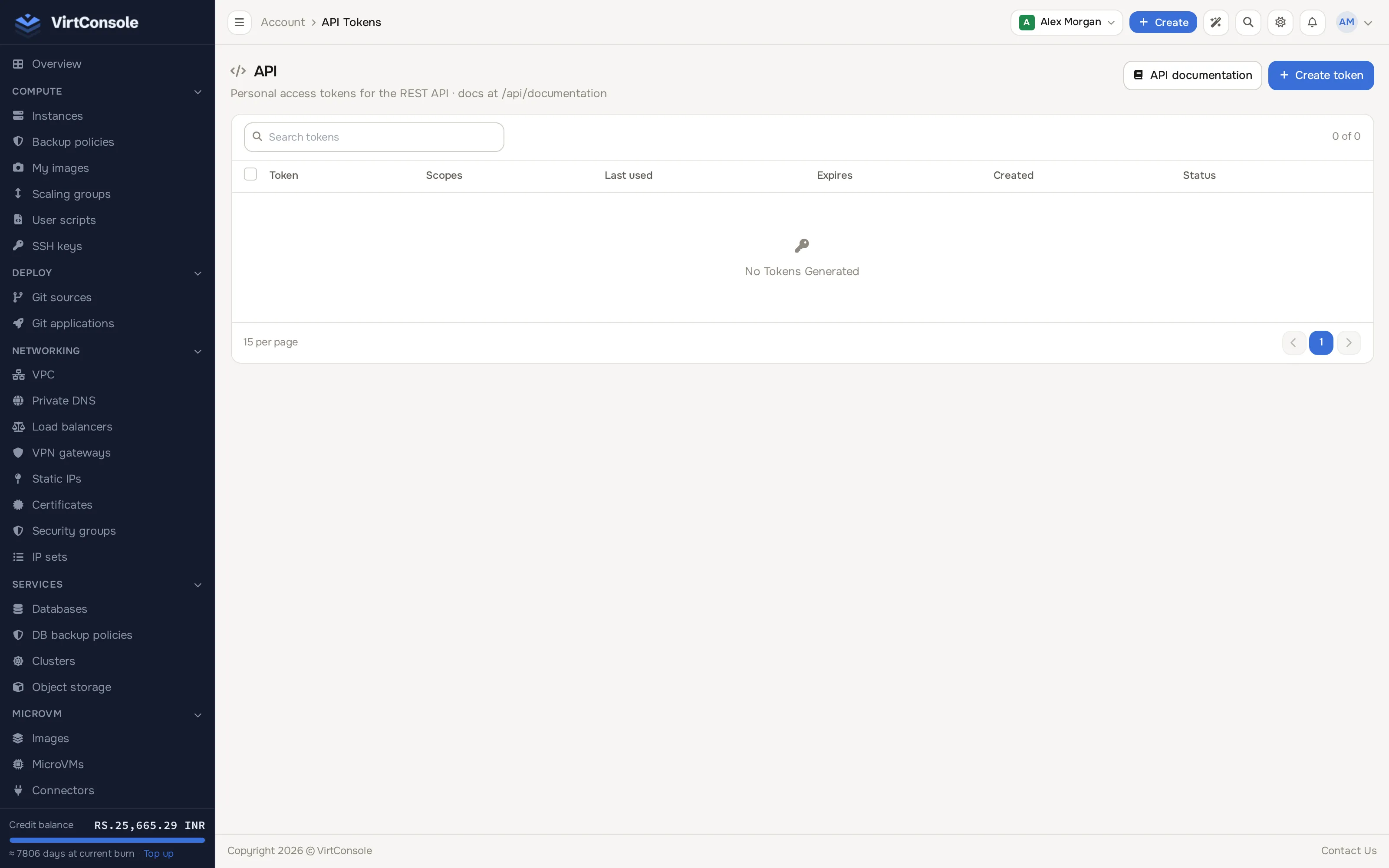
Section titled “Where to find it”In the user panel click API in the sidebar (it sits on its own, below the main navigation groups). The page lists your tokens with their names, IP restriction, scopes, last used date, expiry, creation date and enabled state.
The API tokens page.
Create a token
Section titled “Create a token”-
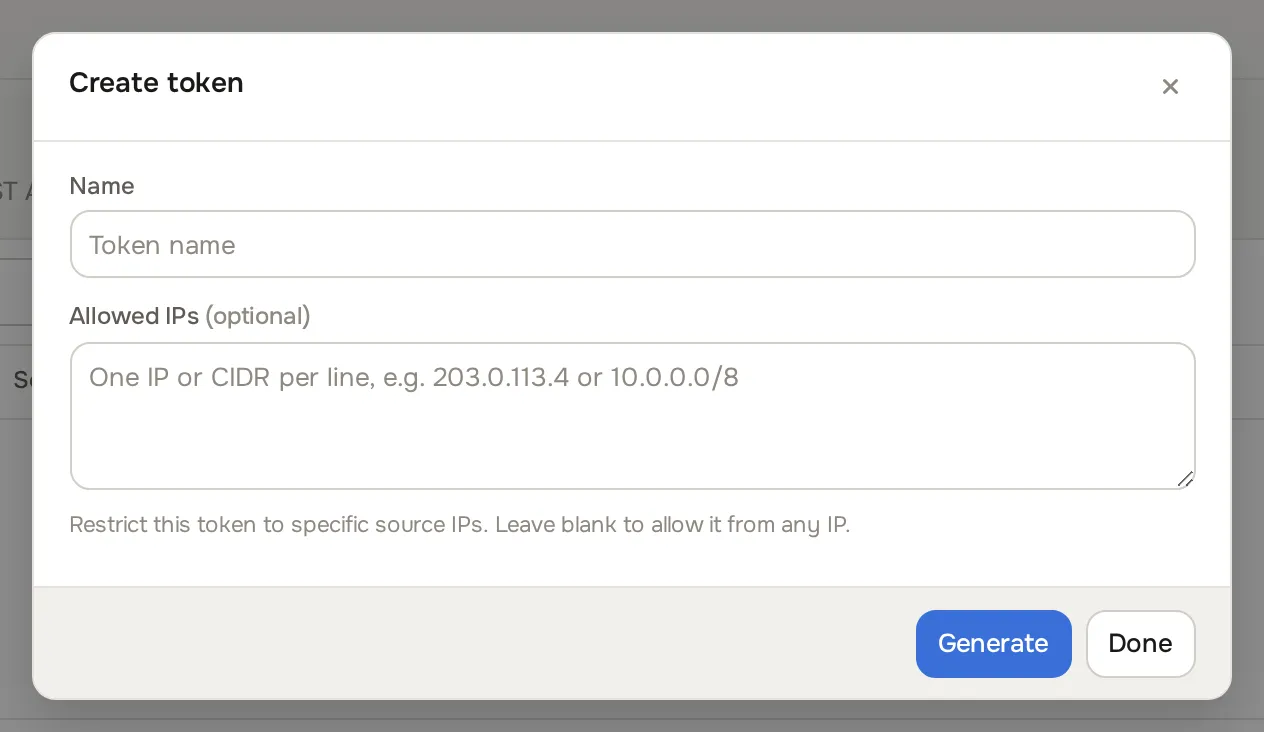
Click Create token. The Create token dialog opens.
-
Enter a Name that tells you what uses it, for example
deploy-script. -
Optionally fill in Allowed IPs, one IP or CIDR per line, to restrict the token to specific source IPs. Leave blank to allow it from any IP.
-
Click Generate. The token value appears once, with Copy and Done buttons.
-
Copy the token now. It is shown only once; store it somewhere safe.
Team members and token ownership
Section titled “Team members and token ownership”A personal API token always belongs to the team member who creates it. A member needs the API tokens permission in their role (see Team members and roles) to create and manage tokens; the tokens they create act as that member, limited to their own team permissions and scoped to the account’s resources.
Each member sees and manages only the tokens they created themselves. The account owner’s token list works the same way: it shows only tokens the owner created, never a shared list of everyone’s tokens.
If you are the account owner, your token list also shows tokens a team member created before 3.3.0. Revoke any you do not recognize.
Use a token
Section titled “Use a token”Send the token as a bearer token with each API request:
curl -H "Authorization: Bearer <token>" https://panel.example.com/api/instancesThe base URL is your panel address followed by /api. The full endpoint reference is generated by the panel itself: click API documentation on the API tokens page to open it in a new tab (/user/api/documentation). The API overview explains authentication and the other API surfaces.
Token scopes
Section titled “Token scopes”Scopes limit what a token can do. A token created in the panel carries no scopes, which means full account access: it can do everything your account can do through the API. Scopes are assigned through the API itself: send a scopes array when you create a token with POST /api/api-tokens, or update an existing token with PATCH /api/api-token/{id}. A null or empty scope list always means full account access; GET /api/api-tokens confirms this default in its response with "scope_defaults": {"unscoped": "full_account"}.
The valid scope names are listed below. Any other name is rejected with a 422 validation error when you create or update a token.
| Scope | What it permits |
|---|---|
instances:read |
Read instances and their details, such as disks, IPs, backups and statistics |
instances:write |
Create and change instances, including power actions, Cloud Service and self-provisioning create/destroy |
vpcs:read |
Read VPC networks, subnets, NAT gateways and VPN gateways |
vpcs:write |
Create and change VPC networks, subnets, NAT gateways and VPN gateways |
load_balancers:read |
Read load balancers |
load_balancers:write |
Create and change load balancers |
databases:read |
Read managed databases, database-targeted backup policies |
databases:write |
Create and change managed databases, database-targeted backup policies |
s3_buckets:read |
Read object storage buckets |
s3_buckets:write |
Create and change object storage buckets |
ssh_keys:read |
Read SSH keys |
ssh_keys:write |
Create and change SSH keys |
security_groups:read |
Read security groups, rules, IP sets and entries |
security_groups:write |
Create and change security groups, rules, IP sets and entries |
kubernetes:read |
Read Kubernetes clusters, pools, tasks and the cluster-creation search endpoints |
kubernetes:write |
Create and change Kubernetes clusters, pools, workers, upgrades and SSL certificates |
images:read |
Read custom images and ISOs |
images:write |
Create and delete custom images |
static_ips:read |
Read static IP allocations |
static_ips:write |
Allocate, assign and deallocate static IPs |
certificates:read |
Read certificates and their usages |
certificates:write |
Upload, request and delete certificates |
microvm:read |
Read MicroVM images, VMs, connectors and API keys |
microvm:write |
Create, build, deploy and manage MicroVM images, VMs and connectors |
autoscaling:read |
Read autoscaling groups and policies |
autoscaling:write |
Create and change autoscaling groups and policies |
billing:read |
Read Cloud Service locations/plans/currencies, usage reports and self-provisioning pack usage |
billing:write |
Create Cloud Service instances (also covered by instances:write) |
user_scripts:read |
Read user scripts |
user_scripts:write |
Create and change user scripts |
projects:read |
Read projects and their assigned resources |
projects:write |
Create, change and assign resources to projects |
monitoring:read |
Read monitoring dashboards, metrics summaries, alert rules and notification channels |
monitoring:write |
Create and change alert rules and notification channels |
dns_zones:read |
Read VPC DNS zones and records |
dns_zones:write |
Create and change VPC DNS zones and records |
volumes:read |
Read block storage volumes, snapshots and backups |
volumes:write |
Create, attach, resize, snapshot and back up block storage volumes |
backup_policies:read |
Read instance backup policies |
backup_policies:write |
Create, attach and detach instance backup policies |
tasks:read |
Read background tasks and their logs |
tasks:write |
Delete task history |
metrics:read |
Read instance, database and load balancer metric series |
metrics:write |
Reserved; no write route exists under /api/metrics today |
webhooks:read |
Read webhook subscriptions, deliveries and the event-kind catalog |
webhooks:write |
Create and change webhook subscriptions |
forge:read |
Read an instance’s Forge (git-deploy) mode status |
forge:write |
Enable, commit and discard an instance’s Forge mode |
ai:read |
Read AI assistant conversations |
ai:write |
Start conversations, send messages and delete conversation history |
account:read |
Read your profile and account dashboard |
account:write |
Update your profile, change password, manage 2FA, manage team members and roles, and manage API tokens (create, update, delete, list) |
How scopes are applied
Section titled “How scopes are applied”- Every route belongs to a resource family derived from its path, for example
/api/instance/...and/api/instancesareinstances,/api/cluster/...and/api/search/...arekubernetes,/api/microvm/...ismicrovm,/api/webhook-subscription...and/api/webhook-event-kindsarewebhooks. Every route in the user API resolves to exactly one family. - The HTTP method picks the access level:
GETandHEADrequests need the:readscope of that family; every other method (POST,PUT,PATCH,DELETE) needs the:writescope. - The token management endpoints (
/api/api-tokensand/api/api-token/{id}), your profile, password, 2FA and team management all fall underaccount:read/account:write. A scoped token without the right one cannot reach them. - Enforcement is deny-by-default: a scoped token that calls a route whose family it does not carry is refused. Unscoped tokens are not affected and keep full account access.
- Two endpoints are exempt from scope enforcement entirely, reachable by any valid token regardless of its scope list:
GET /connect(bearer sanity check) andGET /version.
A refused request returns HTTP 403 with this body:
{ "success": false, "message": "Token scope does not permit this action."}Disable or revoke a token
Section titled “Disable or revoke a token”- Disable: flip the toggle on the token row. The token stops working but stays listed, so you can re-enable it later.
- Revoke: click the delete button on the row. The token is destroyed permanently; anything still using it gets authentication errors.
- Shorten its lifetime:
PATCH /api/api-token/{id}with anexpires_atdate lets you make a token expire sooner. It only ever shortens - a date later than the token’s current expiry, or removing the expiry of a token that already expires, is rejected with 422. A token created in the panel never expires by default.
Common problems
Section titled “Common problems”- I lost the token value. Tokens are shown once at creation. Revoke it and generate a new one.
- Requests are rejected from some machines only. The token has an IP restriction. Edit the allowed IPs or generate a token without one.
- Requests return 403 with “Token scope does not permit this action.” The token carries a scope list and the route you call needs a scope that is not in it, or no scope can cover that route at all. Add the scope the route needs to the token, or use a token without scopes.
- I cannot see the API page. Your team role lacks the API tokens permission, or your provider has restricted it. Ask the account owner or your provider.