

Kubernetes image baking
Every Kubernetes node the panel creates boots from a pre-built VM image. Image baking is building that image once per Kubernetes minor version: a throwaway VM gets the Kubernetes binaries installed and the required container images pre-pulled, then its disk is snapshotted. A fresh node then only has to apply per-cluster configuration from cloud-init, so clusters provision in minutes instead of half an hour.
This is admin-only work. Customers never see it; they pick from the versions you register under Supported Versions.
What to bake
Section titled “What to bake”Either bake two images per Kubernetes minor version (recommended), or one combined image used for both roles.
| Control plane image | Worker image | |
|---|---|---|
| Pre-pulled | etcd, kube-apiserver, scheduler, controller-manager, plus the shared set | the shared set |
| Disk size | 20 GB | 40 GB |
| Image purpose | Kubernetes control plane | Kubernetes worker |
The shared set is kube-proxy, coredns, the pause image, the CNI plugin (Cilium by default) and metrics-server. Both images also carry the panel’s bootstrap agent and, on the control plane image, the cloud controller manager container.
Bake one set per minor version (1.34, 1.35, and so on). Kubernetes does not let nodes drift more than one minor version apart, and patch versions are picked at build time.
Before you begin
Section titled “Before you begin”- A throwaway VM running a supported base OS: Ubuntu 22.04 LTS or newer, Debian 12 or 13, RHEL 9+, CentOS Stream 9+, Rocky Linux 9+, AlmaLinux 9+, or Fedora 39+. 4 vCPU, 4 GB RAM and 30 GB disk is comfortable.
- Root access on that VM, outbound internet (the script downloads packages and container images), and about 6 GB of free disk.
- 30-60 minutes per image. Most of that is downloading.
- The build script. It ships in the management server source tree at
docs/kubernetes/scripts/bake.sh.
Build the image
Section titled “Build the image”Run everything as root inside the throwaway VM.
-
Copy
bake.shonto the VM and make it executable:Terminal window chmod +x bake.sh -
Run it for the role you are building:
Terminal window ./bake.sh --version 1.34.2 --role worker --cni cilium./bake.sh --version 1.34.2 --role cp --cni cilium./bake.sh --version 1.34.2 --role combined # one image for both roles
Flags
| Flag | Values |
|---|---|
--version |
Required. Full patch (1.34.2) or minor (1.34); for a minor, the script lists the available patches and lets you pick. |
--role |
cp, worker or combined. Default combined. |
--cni |
cilium (default), calico or flannel. |
Environment overrides you may need
| Variable | Default | What it controls |
|---|---|---|
CCM_REGISTRY |
ghcr.io/hypervisor-io |
Where the cloud controller manager image is pulled from. |
CCM_IMAGE_NAME |
cloud-controller-manager |
CCM image name. |
CCM_VERSION |
latest |
CCM image tag. |
KUBERNETES_AGENT_VERSION |
latest |
Pin for the baked bootstrap agent. |
KUBERNETES_AGENT_URL |
release URL | Full download URL, for a mirror or fork. |
REGISTRY_MIRROR |
empty | Mirror prefix for registry.k8s.io pulls, for restricted networks. |
The script is idempotent. If it is interrupted, re-run it and it picks up where it left off.
-
Verify the result inside the VM:
Terminal window kubelet --versionkubeadm versionsystemctl is-active containerd # activesystemctl is-enabled kubelet # disabled; cloud-init enables it after certs existlsmod | grep -E 'overlay|br_netfilter'sysctl net.bridge.bridge-nf-call-iptables net.ipv4.ip_forwardcrictl images | grep -E 'kube-apiserver|pause|coredns'systemctl is-active qemu-guest-agent # activeEvery check should pass. If something fails, fix the script input and re-run. Do not patch the snapshot by hand; the fix will not survive the next bake.
-
Shut the VM down and snapshot its disk with whatever your storage layer offers (Ceph snapshot,
virsh snapshot-create-as,qemu-img convert).Terminal window shutdown -h now
Register the image in the panel
Section titled “Register the image in the panel”-
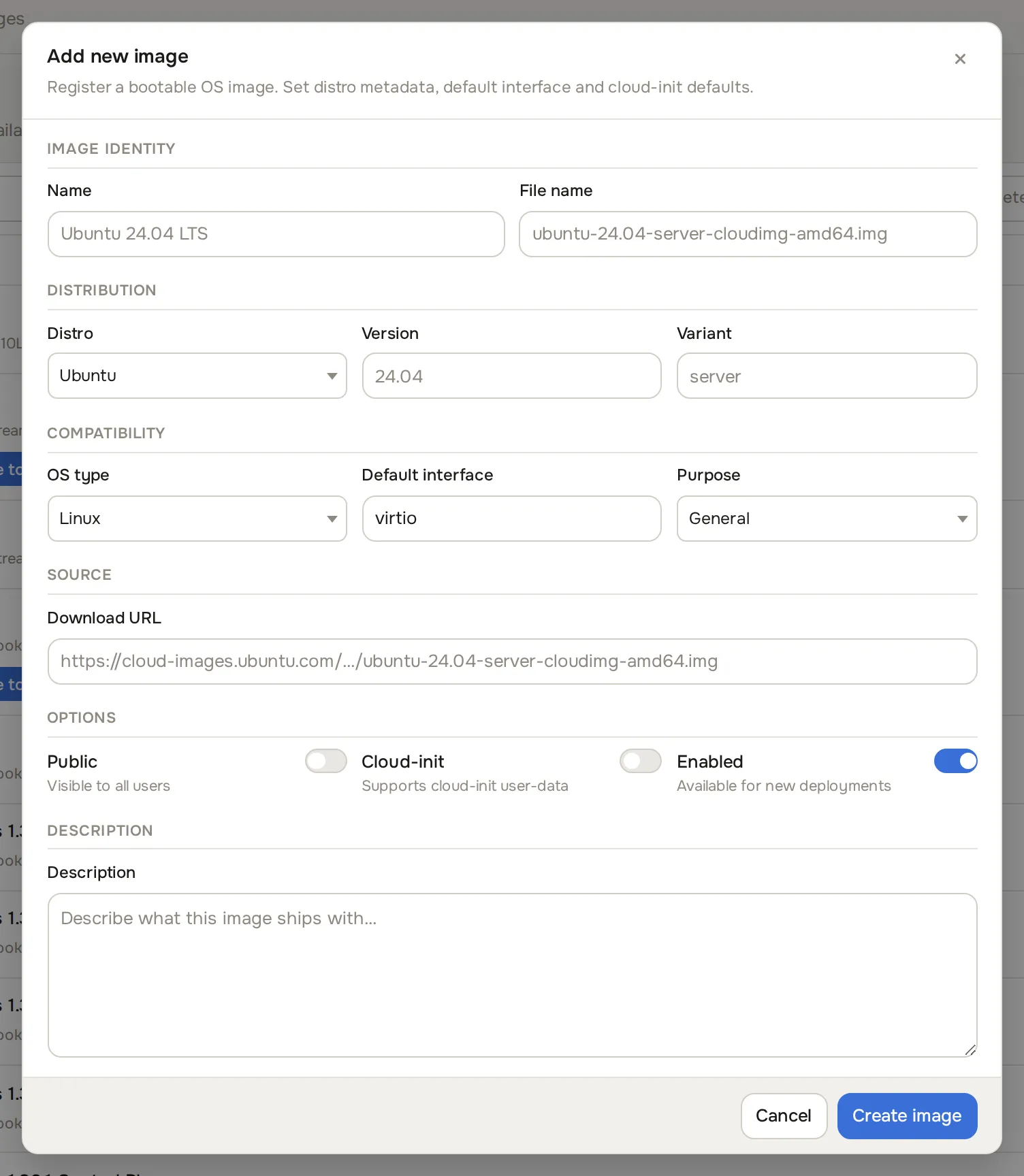
Go to Media & DNS > Images and click Add Image. The Add Image dialog opens.
-
Fill in the registration form:
- Name: for example
K8s Control Plane 1.34.2orK8s Worker 1.34.2. - Download URL: pointer to the snapshot, in whatever URL form your storage backend accepts.
- Default interface: usually
virtio. - Purpose:
Kubernetes control planeorKubernetes worker. - Cloud-init toggle: on. Public: off (admin-managed image). Enabled: on.
- Name: for example
-
Save. The image appears in the Media & DNS > Image browser catalogue and in the Supported Versions image pickers.
Wire the image into a supported version
Section titled “Wire the image into a supported version”- Go to Platform services > Supported versions and click Register Version (or edit the row for that version).
- Pick the new images for Control Plane Image and Worker Image.
- Save. The version is now selectable in the customer create wizard. The full field list is on the Admin setup page.
Update to a new patch version
Section titled “Update to a new patch version”Image references on a registered version are fixed. To roll out a new patch (for example 1.34.2 to 1.34.3):
- Re-run
bake.shwith the new--version. - Snapshot under a new name and register the images in Media & DNS > Images.
- Register a new row in Platform services > Supported versions pointing at the new images.
- Existing clusters do not upgrade themselves; customers promote per cluster with rolling upgrades.
- Mark the old version
Deprecatedonce the new one is published, andEOLonce no cluster references it.
Common problems
Section titled “Common problems”- The script halts during package install. The VM needs to reach
pkgs.k8s.io, the Docker CE repo, the distro mirrors and your container registry. On stock RHEL 9, attach the BaseOS and AppStream repos first. On Debian or Ubuntu after an unclean exit, rundpkg --configure -a && apt update. crictl imagesis missing pre-pulled containers. The registry is unreachable, or a custom registry needs credentials in/etc/containerd/config.toml. The pull step is idempotent; re-run the script.- Nodes come up but stay
NotReady. The CNI fails at cluster create time. Confirm the CNI containers are actually pre-pulled in the image, and that the Pod CIDR the customer picked matches the CNI’s expectation (Cilium accepts any; Flannel defaults to10.244.0.0/16). - kubelet will not start on first boot. Confirm
systemctl is-enabled kubeletreturnsdisabledon the snapshot, and read/var/log/cloud-init-output.logon the node.