

System DNS
System DNS gives every publicly reachable resource a hostname the moment it is provisioned. An instance that comes up on 203.0.113.7 becomes vm-203-0-113-7.cloud1.example.com. Named resources use their own name:
| Resource | Example hostname |
|---|---|
| Instance | vm-203-0-113-7.cloud1.example.com |
| Load balancer | lb-frontend.cloud1.example.com |
| Managed database | db-prod-mysql.cloud1.example.com |
| Kubernetes control plane | k8s-myapp-cp.cloud1.example.com |
Records are created on deploy, updated when the IP changes, and removed on destruction. A matching PTR record is set where possible, so forward and reverse lookups agree. The domains are yours: you add base domains, delegate them, and the panel allocates names under them.
Before you begin
Section titled “Before you begin”An authoritative DNS provider registered under Media & DNS > DNS providers. Only PowerDNS providers work for System DNS. If you do not have one, deploy it first. See PowerDNS cluster.
Where to find it
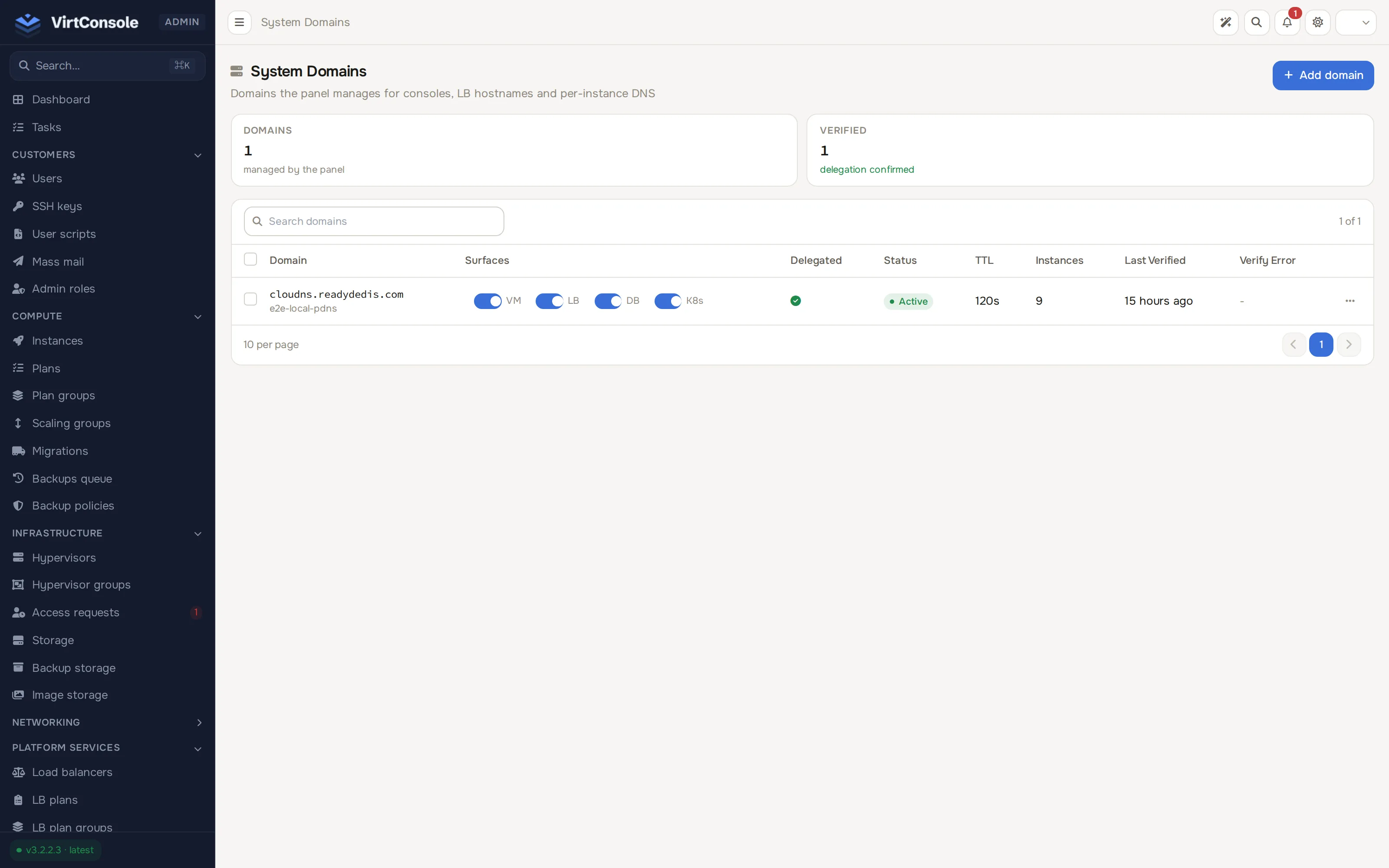
Section titled “Where to find it”In the admin panel go to Media & DNS > System domains. The list shows each domain’s status, the resource types it names, TTL, assigned instance count, last verification, and any verify error.
Add a domain
Section titled “Add a domain”Click Add domain. The wizard has four steps.
-
Domain + provider. Enter the base domain (for example
cloud1.example.com) and pick the PowerDNS provider that will host it. Set the nameserver hostnames (ns1, plus optional ns2 to ns4), the TTL (seconds), and an optional Hostmaster email. Under Available for, choose which resources the domain serves: Instances, Load Balancers, Managed Databases, Kubernetes. Click Continue. The zone is created on the provider immediately.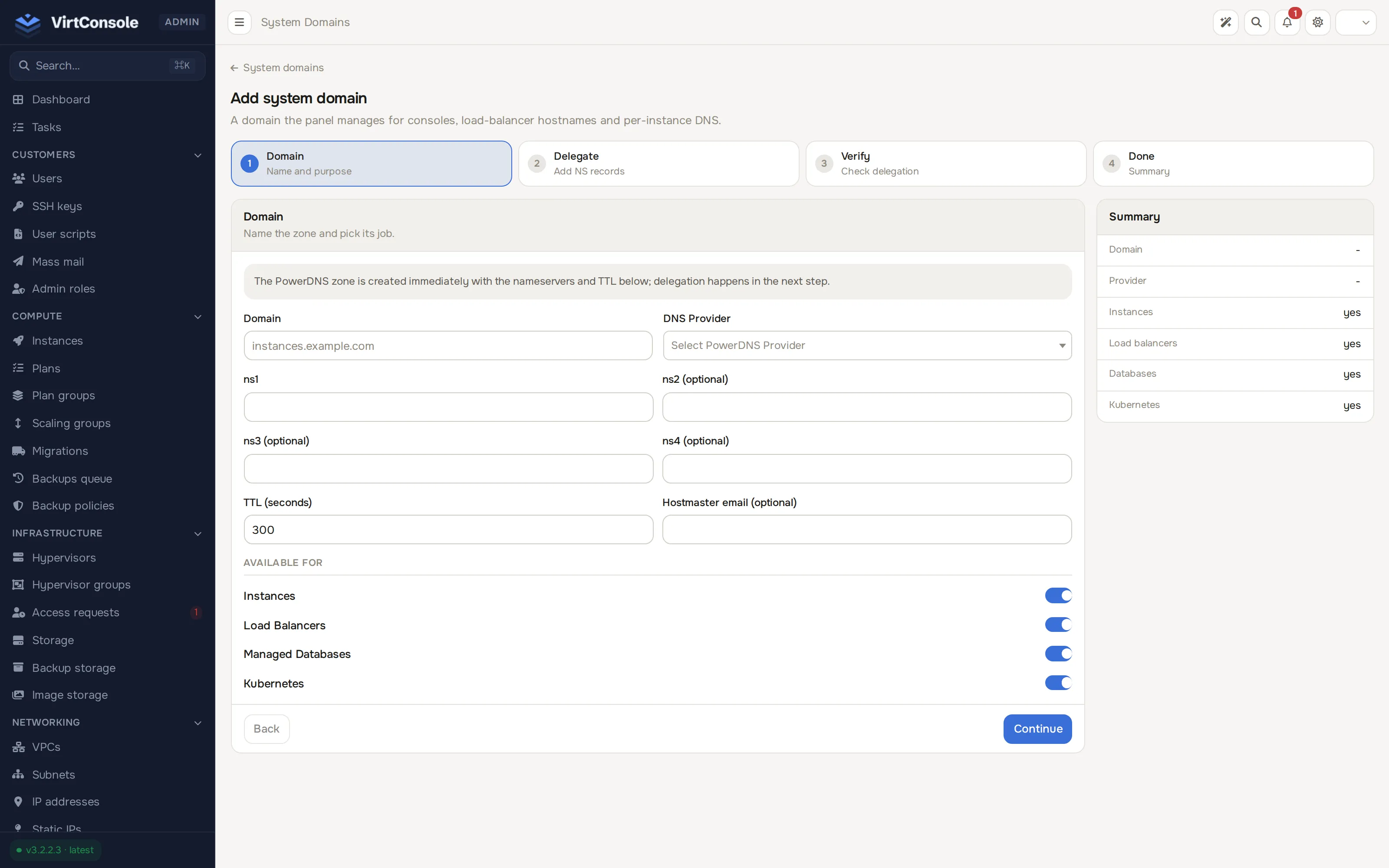
-
Delegate. Create NS records for the base domain at your registrar pointing at the nameservers, plus A records for the nameserver hostnames if they live under the same parent. On Cloudflare, both must be DNS only (grey cloud).
-
Verify. The panel writes a random TXT record into the zone, then checks that the parent nameservers really delegate the domain and that public resolvers see the TXT through that delegation. If either check fails, the reason is shown and you can retry; delegation can take a few minutes to propagate. The TXT record is removed once verification passes.
-
Done. The domain is active and joins the rotation.
Domain states
Section titled “Domain states”| State | Meaning |
|---|---|
| Pending delegation | Created, not yet verified. No records are written. |
| Active | Verified and in use. |
| Degraded | A re-check could not confirm the delegation. Existing records keep resolving, but no new resources are assigned. Cleared automatically on the next successful check. |
| Disabled | Turned off by an admin. Assigned resources move to another active domain, or lose their names if there is none. |
Row actions: Verify delegation (re-run the check), Enable / Disable, Remove, and Resume setup when initial verification failed. The toggles in the Surfaces column control which resource types a domain serves, the same choices as Available for in the wizard.
Re-enabling a domain that was disabled returns it to pending delegation, not straight to active. Verify it again before it takes new resources.
How domains are chosen
Section titled “How domains are chosen”When a resource needs a name, the panel picks the active domain carrying the fewest resources, so several base domains fill evenly. The choice is sticky: a resource keeps its domain for its lifetime, so a name does not move around underneath a customer.
Wildcard TLS certificates
Section titled “Wildcard TLS certificates”A base domain can hold one Let’s Encrypt wildcard certificate covering *.cloud1.example.com plus the bare domain. Managed databases with a public IP receive it automatically, so customers connecting to db-prod-mysql.cloud1.example.com verify against the public trust store instead of trusting a self-signed certificate.
Issue the certificate from an active domain. Verification must have passed, because issuance depends on the same delegation. Issuance uses the DNS-01 challenge: the panel writes the challenge record into the zone it already owns, so nothing is installed on the database, no ports open, and no DNS credentials leave the panel. Issuance runs while you wait, normally around a minute.
One wildcard per domain renews once per cycle, so Let’s Encrypt’s limit of 50 certificates per week per registered domain is never a factor for the panel itself. That limit only matters if customers run their own ACME clients against hostnames assigned here; every such issuance draws on the domain’s shared budget. Listing the base domain on the Public Suffix List gives each customer their own budget, at the cost of browsers treating the domain as a cookie boundary and a listing that takes time to propagate.
Common failure reasons:
| Reason | What to do |
|---|---|
| The domain is not active | Verify the delegation first. |
| The challenge record was not visible in time | Check the provider is reachable and the zone exists. |
| The provider is disabled | Re-enable it under Media & DNS > DNS providers. |
| Rate limited | Wait, or use a different base domain. |
What happens to databases
Section titled “What happens to databases”On issue or renewal the certificate is pushed to every public managed database already named under the domain. Databases that gain a name later receive it then. The panel writes the material, checks the certificate and key are a pair, and reloads the engine without restarting it:
| Engine | Reload |
|---|---|
| MySQL 8+ | ALTER INSTANCE RELOAD TLS |
| MariaDB 10.4+ | FLUSH SSL |
| PostgreSQL | pg_reload_conf() |
Older MySQL and MariaDB releases have no reload statement. There the certificate is installed and the database is marked pending restart: it keeps serving the previous certificate until the engine restarts. That state is shown distinctly on purpose.
Customers connect by hostname, not IP, with verification on:
mysql -h db-prod-mysql.cloud1.example.com -u appuser -p --ssl-mode=VERIFY_IDENTITYpsql "host=db-prod-pg.cloud1.example.com user=appuser sslmode=verify-full dbname=app"No CA file is needed; the certificate chains to a public root that operating systems already trust.
Scope and limits
Section titled “Scope and limits”- Public-IP databases only. A database on a private VPC subnet has no System DNS name and receives no certificate.
- Databases only. Load balancers keep their own certificate flow for customer-owned domains. Instances do not receive the certificate: handing your zone’s private key to a customer VM is a trust decision, not a technical one.
- Kubernetes control planes are unaffected. Their certificates come from the cluster’s own certificate authority.
Renewal starts 30 days before expiry and retries daily, so a failed attempt has a month of retries. A failed renewal never removes the current certificate; the failure is recorded on the domain. To renew early, issue again; re-issuing is safe at any time.
Keeping records correct
Section titled “Keeping records correct”Records are written when a resource changes, and an hourly reconciliation catches anything the immediate path missed, removes records for resources that no longer exist, and corrects records whose IP or TTL has drifted. DNS never blocks provisioning: if the provider is unavailable, the resource is still created and its record is written when the provider comes back.