

NAT gateways
A NAT gateway gives instances on private VPC subnets outbound internet access while the internet still cannot reach in. It source-NATs outbound traffic through a dedicated public IPv4. Each VPC supports at most one NAT gateway.
Enable NAT gateways on a location
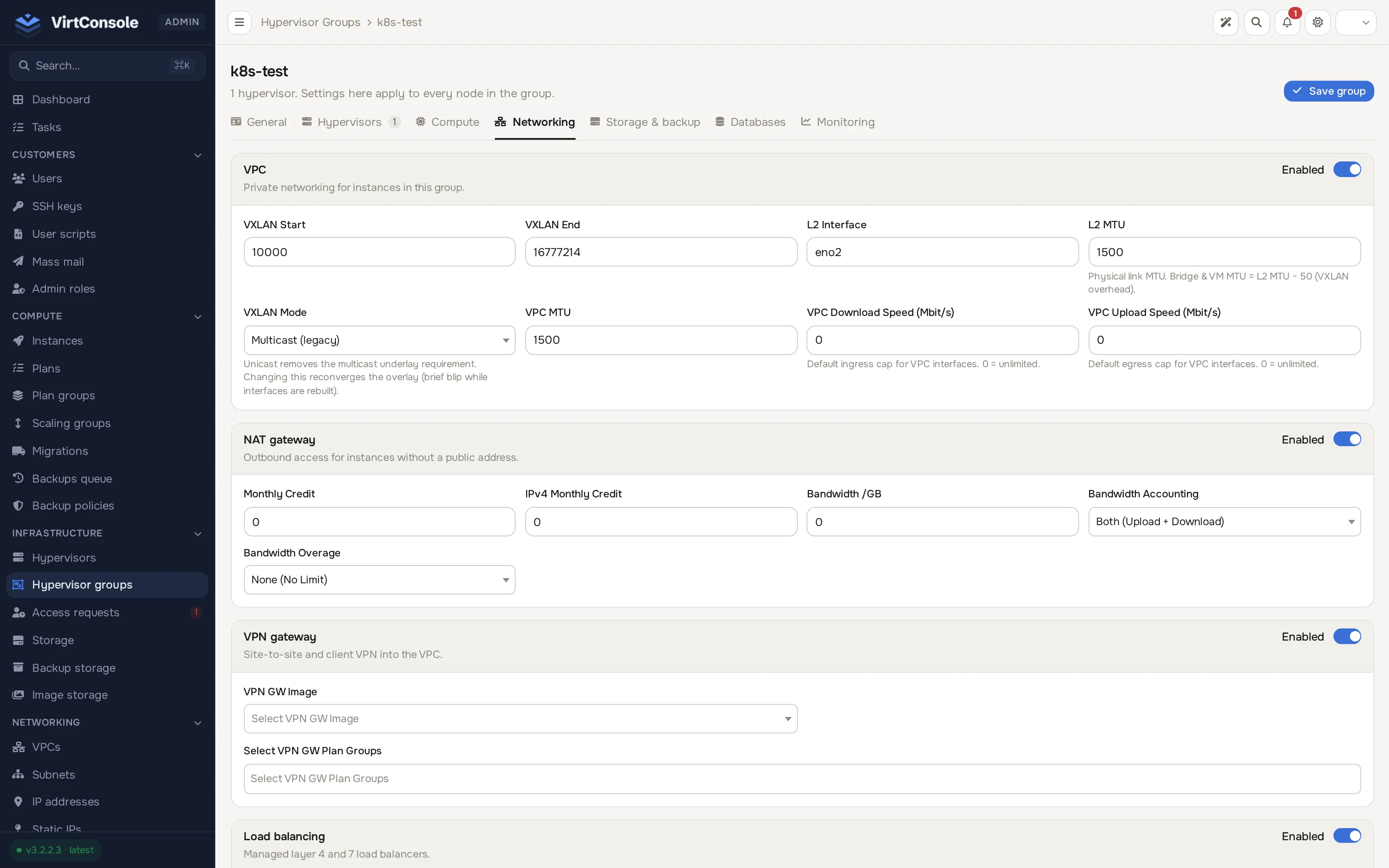
Section titled “Enable NAT gateways on a location”The NAT gateway section appears on a hypervisor group’s Networking tab once VPC is enabled there.
- Go to Infrastructure > Hypervisor groups, open the group, and click the Networking tab.
- In the NAT gateway section, turn on its Enabled toggle.
- Set the pricing:
Pricing
| Field | What it does |
|---|---|
| Monthly Credit | Base monthly cost in credits. The panel derives the hourly rate from it. |
| IPv4 Monthly Credit | Monthly cost of the gateway’s dedicated public IPv4. Shared with static IP pricing. |
| Bandwidth /GB | Per-GB price for gateway traffic. 0 disables per-GB charging. |
| Bandwidth Accounting | Both (Upload + Download), Uploads Only, or Downloads Only. Controls which direction is metered, from the guest’s point of view: uploads are traffic the guests send, downloads is traffic they receive. |
| Bandwidth Overage | None (No Limit), Charge Overage (bill per GB above the allowance), or Revoke Access (suspend the gateway when the cap is hit). |
- Click Save group.
Customers in this location can now create a NAT gateway in their VPCs.
Manage gateways
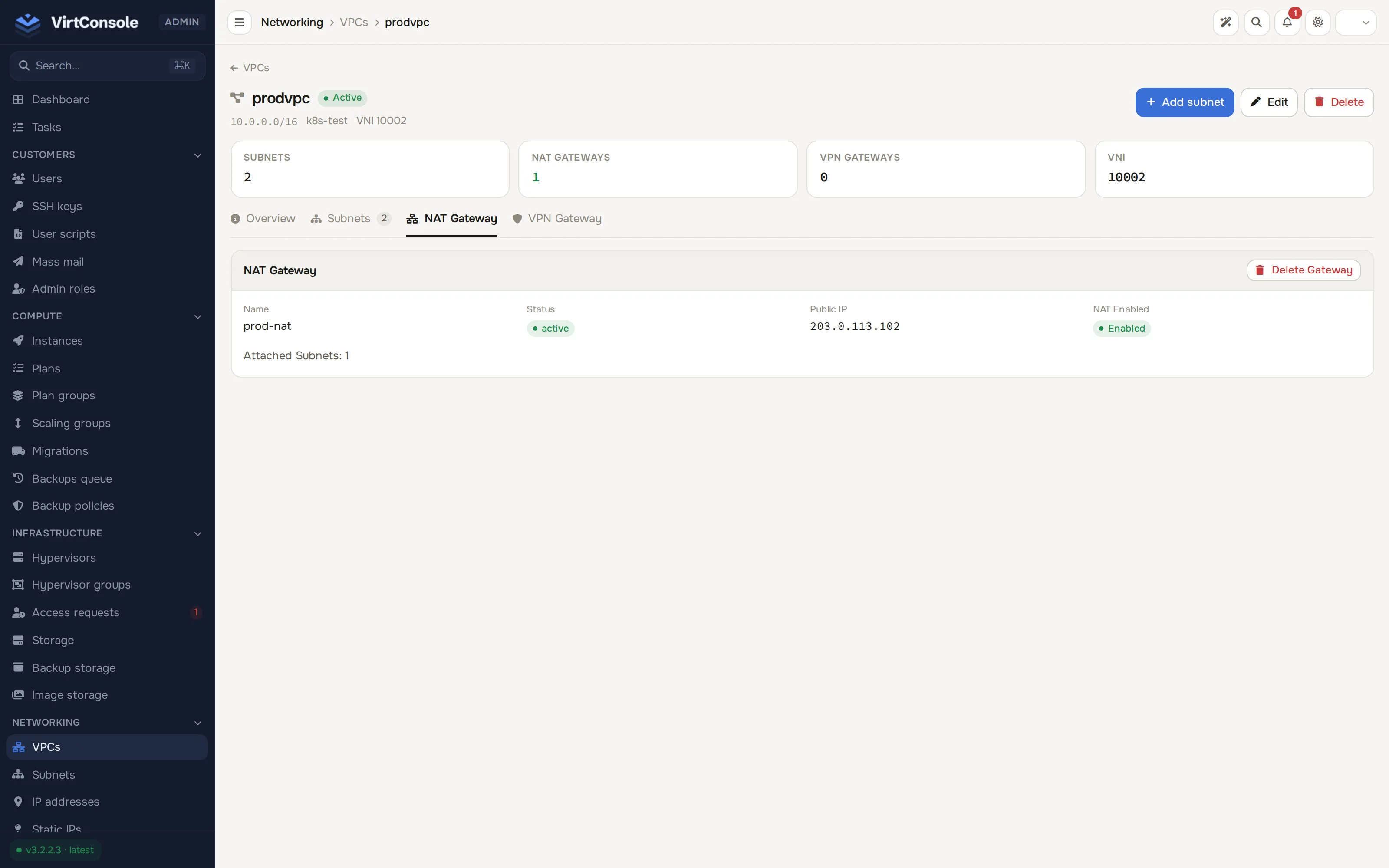
Section titled “Manage gateways”There is no standalone NAT gateway list. Go to Networking > VPCs, open the VPC, and click the NAT Gateway tab. It shows the gateway’s name, status, public IP, NAT state, and attached subnet count.
- Create NAT Gateway. Enter an optional Name (Optional), then click Create Gateway. The panel provisions the gateway and allocates its public IP.
- Delete Gateway. Removes the gateway, releases the public IP, and cuts outbound access for the attached subnets.
Customers attach and detach their private subnets on the gateway, and switch NAT on or off without deleting the gateway, from their own VPC page. See VPC (user guide).
Gateway states
Section titled “Gateway states”| Indicator | Values | Meaning |
|---|---|---|
| Status | Active, Inactive, Creating, Deleting, Pending |
Operational state of the gateway. |
| NAT state | Enabled, Disabled, Bandwidth Suspended | Whether traffic currently flows. Bandwidth Suspended clears automatically at the start of the next billing cycle. |
Billing
Section titled “Billing”The gateway bills hourly for as long as it exists, whether NAT is enabled, disabled, or suspended. Per-GB bandwidth charges follow the location’s accounting and overage settings. Both charges appear in the Cloud Service usage report. See Cloud Service.
Common problems
Section titled “Common problems”- Instances cannot reach the internet. Check that the gateway status is Active with NAT enabled, that the instance’s subnet is attached, and that the gateway is not Bandwidth Suspended.
- Customers see no create option. NAT Gateway is not enabled on the VPC’s hypervisor group.
- Billing continues after disabling. Expected. The base hourly charge applies while the gateway exists. Delete it to stop.