

PowerDNS cluster
The panel writes DNS records over the PowerDNS HTTP API. Two features depend on it:
- Reverse DNS writes PTR records for public IPs. See Reverse DNS.
- System DNS gives every provisioned resource a resolvable name. See System DNS.
This page covers deploying the authoritative servers: one primary that the panel talks to, and any number of secondaries that answer queries from the internet.
The deployment kit ships inside your management server installation at deploy/powerdns/. It contains Docker Compose files, a bootstrap script, and a fleet setup script. It is also maintained as an open-source repository you can clone onto the machine that will be your primary:
git clone https://github.com/hypervisor-io/powerdns-cluster.gitcd powerdns-clusterEverything below assumes you work from that folder.
How replication works
Section titled “How replication works”The panel only ever talks to the primary. Secondaries copy zones with standard DNS zone transfer (AXFR), triggered by a NOTIFY whenever a zone changes. Transfers are signed with a TSIG key, so a stranger who finds your primary cannot pull your zones.
Secondaries run with autosecondary enabled. When the panel creates a new zone, the primary notifies each secondary and the secondary provisions that zone by itself. You never log into a secondary to add a zone. That is what makes adding the fifth nameserver no harder than adding the second.
Quickstart
Section titled “Quickstart”On the machine that will be your primary:
cd powerdns-cluster./bootstrap.shThe script generates an API key and a TSIG key, starts the primary, waits for it to become healthy, and prints:
- the exact values to enter in the panel under Media & DNS > DNS providers
- the records to create at your registrar
- the command to run for each secondary
Nothing is overwritten if you run it twice. Existing secrets are kept.
Multi-node setup
Section titled “Multi-node setup”You do not have to log into each secondary. Authorize SSH from the primary to each node, list the nodes, and one script converges the whole fleet.
-
From the primary, give yourself key-based SSH to each secondary:
Terminal window ssh-copy-id root@203.0.113.11ssh-copy-id root@203.0.113.12 -
List the nodes:
Terminal window cp nodes.conf.example nodes.confnano nodes.conf # one user@host[:port] per line -
Converge the fleet:
Terminal window ./cluster-setup.sh --dry-run./cluster-setup.sh
The script starts with a preflight table and changes nothing until every node passes:
| Check | Meaning |
|---|---|
| SSH | The primary can log into the node with the key you provided. |
| ROOT | That login can act as root, directly or through sudo. |
| DOCKER | Docker and the Compose plugin are installed. |
| PORT53 | Nothing else is holding UDP/TCP port 53. |
| DISK | At least 2 GB free. |
After converging the nodes, a verification pass queries each node directly for the canary zone and prints PASS or FAIL per node. If any node fails, the script exits non-zero. Re-run the script whenever you add a node; it is idempotent.
Readiness failures
Section titled “Readiness failures”- SSH. Check from the primary:
ssh -i ~/.ssh/id_rsa root@203.0.113.11 'echo ok'. Common causes: the public key is missing from the node’s~/.ssh/authorized_keys(fix withssh-copy-id), the node listens on a non-standard port (writeroot@203.0.113.11:2222innodes.conf), a firewall blocks port 22, or you need a non-default key (pass--ssh-key /path/to/key). - ROOT. PowerDNS binds port 53, which is privileged. Log in as root or grant passwordless sudo on the node; a sudo that prompts for a password fails because the script runs non-interactively.
- DOCKER. By default the script installs Docker for you. It refuses when you pass
--no-docker-install, or when the node has no systemd. Install Docker manually in those cases, then re-run. - PORT53. Find the holder with
ss -lnup | grep ':53 '. If it issystemd-resolved, the script frees it unless you pass--no-port53-fix; the stub listener is what binds127.0.0.53:53, and disabling it does not break local resolution. If it is another nameserver (BIND, dnsmasq, Unbound), the script will not touch it. Decide deliberately whether to stop that service or use a different host. - DISK. Less than 2 GB free on
/. Free space or use a larger host.
Replication not working
Section titled “Replication not working”A node passed preflight and converged, but the verification pass could not confirm the canary zone. Work through in order:
-
Is the secondary reachable on port 53 at all?
Terminal window dig @203.0.113.11 hypervisor-canary.invalid SOA -
Did the primary try to notify it? On the primary:
Terminal window docker compose -f docker-compose.primary.yml logs --tail=100 pdns | grep -i notifyNo NOTIFY lines usually means the primary is not running as a primary. Confirm
--primary=yesis present indocker-compose.primary.yml. -
Did the secondary refuse the transfer? On the node:
Terminal window docker compose -f docker-compose.secondary.yml logs --tail=100 pdns | grep -iE 'notify|axfr|refus'Received unsigned NOTIFY from potential autoprimary. Refusing.means the zone has no TSIG metadata on the primary. Run./sync-zone-tsig.shon the primary, then notify again.Signature ... failed to validatemeans the two nodes hold different TSIG secrets. Re-run./cluster-setup.sh, which pushes the current key to every node. -
Is the node authorized? On the primary, the node’s IP must appear in
allow-axfr-ips../add-secondary.sh 203.0.113.11adds it and is safe to re-run. -
Is the zone new? PowerDNS caches the list of zones it serves. A zone created outside the API is invisible to the running server until that cache refreshes, several minutes by default. Force it:
Terminal window docker compose -f docker-compose.primary.yml exec pdns pdns_control rediscoverdocker compose -f docker-compose.primary.yml exec pdns pdns_control notify ZONE
Zones created by the panel
Section titled “Zones created by the panel”TSIG permission is stored per zone, as zone metadata. The panel creates zones over the API and has no knowledge of your TSIG key, so a zone it creates starts with no transfer permission attached and does not replicate until fixed.
sync-zone-tsig.sh attaches the key to every zone that is missing it. Run it on the primary from cron:
*/5 * * * * cd /path/to/powerdns-cluster && ./sync-zone-tsig.sh >/dev/null 2>&1The bootstrap and add-secondary scripts run it too, so this only matters for zones created later by the panel.
Wiring it into the panel
Section titled “Wiring it into the panel”In the admin panel go to Media & DNS > DNS providers and click Add provider. The Add DNS Provider dialog opens.
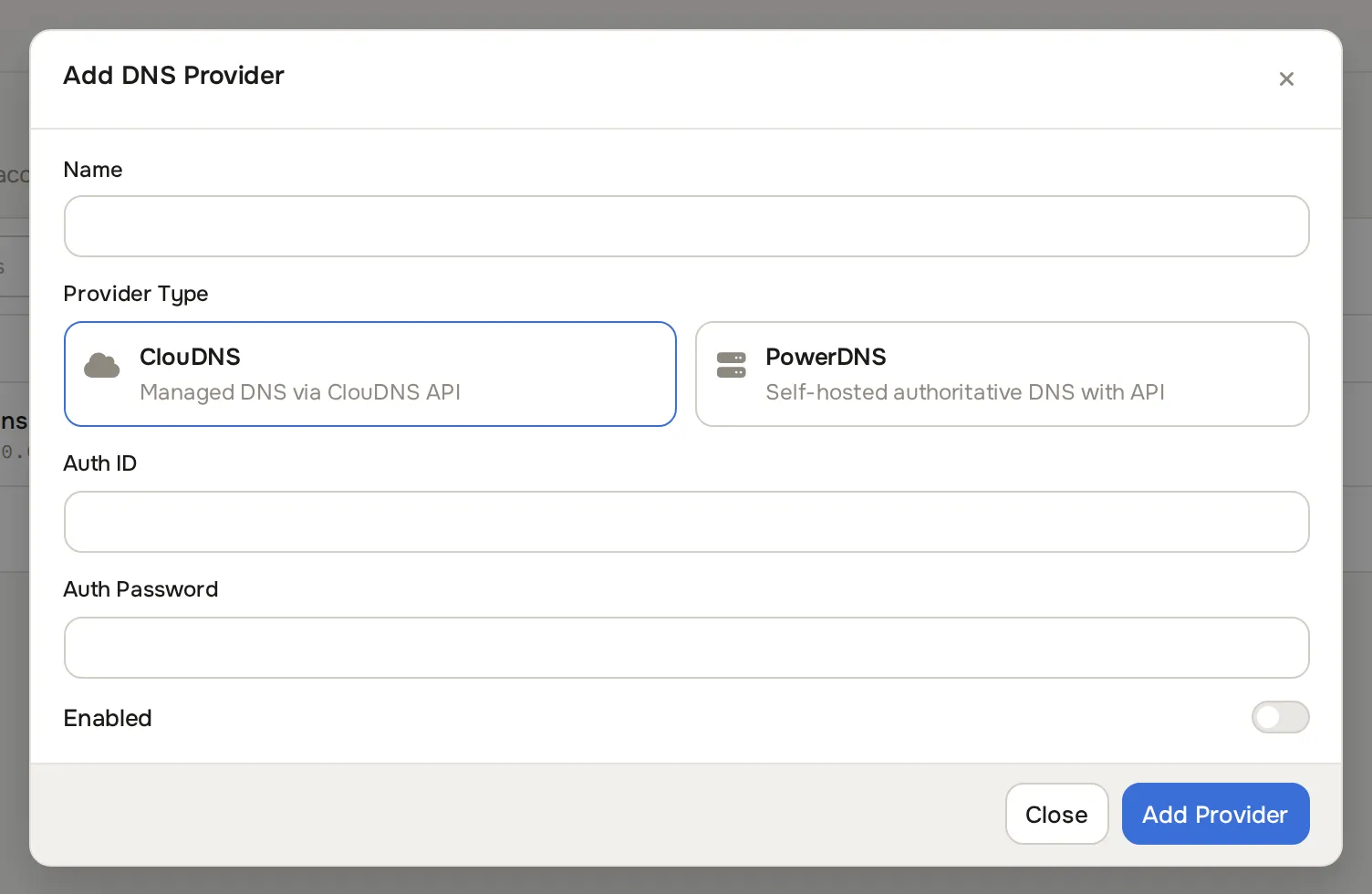
Fill in:
| Field | Value |
|---|---|
| Provider Type | PowerDNS |
| Name | Any label, for example primary-dns |
| Hostname | http://203.0.113.10 (the scheme is required) |
| Port | The API port, 8081 by default |
| API Key | The key printed by bootstrap.sh |
| Enabled | On |
The API binds to loopback and private ranges by default. If the panel runs on a different host, set PRIMARY_API_ALLOW_FROM and PRIMARY_API_BIND in .env to admit exactly that host, and put the API behind TLS or a private network. Never expose it to the internet.
Delegating at the registrar
Section titled “Delegating at the registrar”Create, at whoever hosts the parent domain:
- An A record for each nameserver hostname, pointing at that node’s public IP. For example
ns1.example.comto203.0.113.10. - NS records for the zone you are delegating, pointing at those hostnames.
If the parent zone is on Cloudflare, both records must be DNS only (grey cloud). Proxying breaks DNS service. Confirm the delegation is live before expecting the panel to verify it:
dig +short NS cloud1.example.com @1.1.1.1Database replication
Section titled “Database replication”You do not have to replicate with AXFR. If every node runs the gmysql backend against a replicated MySQL, all nodes read the same data and there is no zone transfer, no NOTIFY, and no TSIG. The per-zone metadata problem above disappears with it.
| AXFR with TSIG (this kit) | Replicated database | |
|---|---|---|
| What crosses the network | DNS zone transfers on port 53 | MySQL replication |
| Between sites you expose | Nothing new | A database port, needing its own TLS and credentials |
| Mixed nameservers | Any AXFR-capable secondary works, including BIND or a third-party DNS provider | Every node must run your MySQL topology |
| New zone propagation | Immediate, on NOTIFY | Waits for the zone cache to refresh, several minutes by default |
| Failure mode | A refused transfer is visible in the logs | Replication lag or breakage is a database problem |
AXFR is the default here because it keeps the blast radius on port 53 and lets you put a secondary anywhere, including at a third party. Choose database replication if you already operate MySQL replication between the same sites. If you do, set every node to the same gmysql credentials, leave primary and secondary off, and lower zone-cache-refresh-interval so newly created zones appear promptly.
Backup and restore
Section titled “Backup and restore”The zone data lives in a Docker volume on the primary. Back it up:
docker compose -f docker-compose.primary.yml exec -T pdns \ sqlite3 /var/lib/powerdns/pdns.sqlite3 .dump > pdns-backup-$(date +%F).sqlKeep .env somewhere safe as well. It holds the API key and the TSIG secret, and without them the panel and the secondaries cannot talk to a rebuilt primary.
Secondaries hold no unique state. A lost secondary is rebuilt by re-running ./cluster-setup.sh.
Upgrading
Section titled “Upgrading”Change PDNS_IMAGE in .env, then upgrade secondaries first, one at a time, confirming each still answers before moving on. Upgrade the primary last.
Pin a specific version rather than tracking a floating tag. Check which major you are pinning: the newest tag is sometimes a pre-release.