

Proxmox Backup Server destinations
A Proxmox Backup Server (PBS) destination stores instance backups on a PBS datastore instead of writing qcow2 files to a mounted path, an S3 bucket or an rclone remote. PBS destinations give you content-addressed deduplication across every instance on the destination, true dirty-bitmap incremental reads on KVM hypervisors, and server-side integrity verification, all inside the same backup policies, schedules, retention rules, restore UI and API your instances already use. PBS is a destination type, not a separate backup product: once a hypervisor’s backup storage points at a PBS destination, everything else about backups works the way it already does.
How it works
Section titled “How it works”- KVM hypervisors run a dedicated backup client (
hypervisor-pbs, installed by the hypervisor provisioner) that speaks the PBS backup protocol directly. On a running instance the hypervisor starts a live pull-mode backup through libvirt: the guest keeps running, a qcow2 dirty bitmap tracks changed blocks, and only those blocks are read and uploaded on an incremental run. Each disk becomes one PBS archive, named by the disk’s own ID. - Proxmox VE nodes back up with their native vzdump into a
pbsstorage entry the panel creates and manages automatically, one per (destination, Proxmox cluster). Dirty-bitmap incremental mode is used whenever PVE can reuse its bitmap. - Both platforms produce snapshots that are independently complete: every snapshot can be restored or deleted on its own, with no chain of earlier backups to rebuild. PBS reuses unchanged chunks across snapshots, so incrementality costs read time, not restore complexity.
Namespaces on the PBS server
Section titled “Namespaces on the PBS server”Every destination has a configured root namespace. Below it the panel organises snapshots automatically:
- KVM instances:
<root namespace>/c-<encoded account owner id>(one child namespace per customer account; the account owner’s ID is encoded to fit PBS’s own 32-character limit on a single namespace component). - Proxmox VE guests:
<root namespace>/pve-<cluster slug>(one child namespace per Proxmox cluster, shared by every customer on that cluster), or<root namespace>/pvg-<encoded cluster id>when the cluster has no slug set or its name would not fit that same 32-character limit.
Child namespaces are created on first use; you never create them by hand. Inside a namespace, each instance is a backup group (vm/<instance name> on KVM, vm/<vmid> on Proxmox).
Before you begin
Section titled “Before you begin”- A Proxmox Backup Server (4.x recommended) with a datastore ready, reachable from every hypervisor that will use it on TCP port
8007. - A few minutes of shell access to the PBS server to create the user, token and namespace below.
- Decide on the root namespace name, for example
vc-backups. At most 6 path components (for exampleprod/euis 2), each at most 32 characters; the panel appends exactly one segment below it.
Prepare the PBS server
Section titled “Prepare the PBS server”Run these steps once per destination, on the PBS server itself. The examples use datastore backups, root namespace vc-backups, user virtconsole@pbs and token master; substitute your own names.
1. Create the user and API token
Section titled “1. Create the user and API token”proxmox-backup-manager user create virtconsole@pbs --comment "VirtConsole backups"proxmox-backup-manager user generate-token virtconsole@pbs master --comment "VirtConsole destination token"The token secret is printed once and never shown again. Save it immediately; you paste it into the panel as the destination’s token secret, and it is stored encrypted there.
2. Create the root namespace
Section titled “2. Create the root namespace”Namespace creation is a client operation, not a manager one, so the very first namespace needs an already-privileged identity, and the client needs the server’s certificate fingerprint to connect non-interactively (fetch it now with proxmox-backup-manager cert info; you will use it again in step 5). Bootstrap with a temporary root@pam token, granted just enough to create this one namespace, then remove the grant and the token again:
proxmox-backup-manager user generate-token root@pam nsboot --comment "temporary: namespace bootstrap"proxmox-backup-manager acl update /datastore/backups DatastoreAdmin --auth-id 'root@pam!nsboot'
PBS_PASSWORD="<the token secret just printed>" PBS_FINGERPRINT="<fingerprint from cert info>" \  proxmox-backup-client namespace create vc-backups --server localhost --datastore backups \  --auth-id 'root@pam!nsboot'
proxmox-backup-manager acl update /datastore/backups DatastoreAdmin --auth-id 'root@pam!nsboot' --delete trueproxmox-backup-manager user delete-token root@pam nsboot
Run this on the PBS server itself, so --server localhost reaches it directly; from elsewhere, use the server’s real hostname or IP.
3. Grant the ACL, twice
Section titled “3. Grant the ACL, twice”Grant DatastoreAdmin on the root namespace path to both the user and the token:
proxmox-backup-manager acl update /datastore/backups/vc-backups DatastoreAdmin --auth-id 'virtconsole@pbs'proxmox-backup-manager acl update /datastore/backups/vc-backups DatastoreAdmin --auth-id 'virtconsole@pbs!master'Both grants are required: PBS resolves a token’s effective permissions from the intersection of the token’s own ACL row and its owning user’s ACL row, so a grant on the token alone gives it no permissions at all. DatastoreAdmin is the smallest role that includes Datastore.Modify, which the token needs to create the per-customer and per-cluster child namespaces itself. Scope the grant to the destination’s own root namespace path, never to the whole datastore, so the token cannot touch another destination’s namespace or any other datastore.
Verify both rows resolve:
proxmox-backup-manager user permissions 'virtconsole@pbs' --path /datastore/backups/vc-backupsproxmox-backup-manager user permissions 'virtconsole@pbs!master' --path /datastore/backups/vc-backups4. Schedule garbage collection and verification on PBS
Section titled “4. Schedule garbage collection and verification on PBS”Retention deletes are issued by the panel (unless you opt into PBS-managed retention below), but garbage collection and verify jobs stay on PBS:
proxmox-backup-manager datastore update backups --gc-schedule dailyproxmox-backup-manager verify-job create vc-backups-daily --store backups --ns vc-backups \ --max-depth 7 --schedule daily --ignore-verified true --outdated-after 7Scoping the verify job to the root namespace covers every child namespace the panel will create under it.
5. Note the certificate fingerprint
Section titled “5. Note the certificate fingerprint”proxmox-backup-manager cert infoThe panel pins this SHA-256 fingerprint on the destination and refuses to talk to a server presenting a different certificate. There is no skip-TLS option.
Add the destination
Section titled “Add the destination”- Go to Infrastructure > Backup storage and click Add Storage.
- Pick the Proxmox Backup Server storage type and fill in the fields:
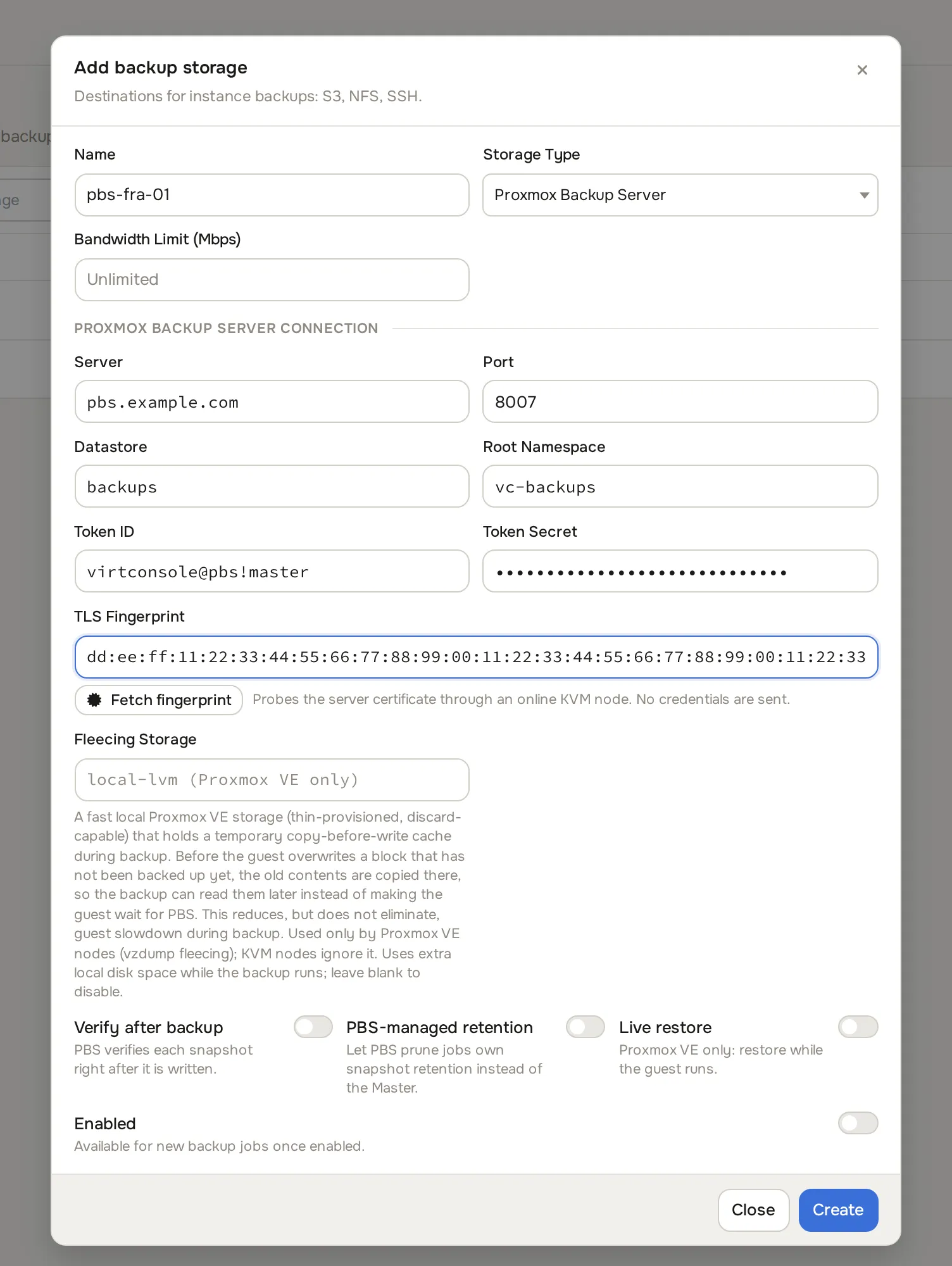
| Field | What to enter | Example |
|---|---|---|
| Host | Hostname or IP of the PBS server. | pbs.example.com |
| Port | PBS API port. | 8007 |
| Datastore | Datastore name (3-32 chars). | backups |
| Root Namespace | Optional root namespace path; at most 6 components, each at most 32 characters. | vc-backups |
| Auth ID | The token’s full ID: user@realm!token. |
virtconsole@pbs!master |
| Token Secret | The token secret from step 1. Write-only: leave blank on later edits to keep the stored value. | |
| Fingerprint | SHA-256 fingerprint of the PBS certificate, colon-separated hex. | 67:52:54:... |
| Bandwidth Limit (Mbps) | Optional cap on backup and restore throughput to this destination. |
Optional switches:
| Switch | What it does |
|---|---|
| Verify after backup | Ask PBS to verify each snapshot right after it is written, in addition to the scheduled verify job on PBS. |
| PBS-managed retention | Hand prune authority to PBS’s own prune jobs for this destination. The panel then never deletes snapshots and only mirrors what PBS reports. Off by default: the panel owns retention. |
| Live restore (Proxmox only) | Pass PVE’s live-restore flag on restores so a guest starts as soon as its disks begin streaming back. |
| Fleecing storage (Proxmox only) | Name of a PVE storage used for backup fleecing (copy-before-write), so a slow PBS upload never stalls guest writes. |
- Use the fingerprint helper to fetch the server’s certificate fingerprint before saving. The helper probes the host without credentials through one of your online KVM hypervisors, shows the fingerprint it found, and asks you to confirm it against
proxmox-backup-manager cert infoon the PBS server; the panel never trusts the fetched value automatically. If no online KVM hypervisor is available yet, copy the fingerprint from the PBS server by hand. - Click Test connection. A successful test proves reachability, authentication, the root namespace, and that the token holds
Datastore.Backup,Datastore.ModifyandDatastore.Pruneon the root namespace. The test requiresDatastore.Pruneeven with PBS-managed retention on. - Switch Enabled on and click Create.

Then assign the destination to hypervisors exactly like any other backup storage: open the hypervisor’s Backups & HA tab and pick it as Backup Storage. See Instance backups. A hypervisor is entirely on PBS or entirely not; there are no mixed bitmap regimes on one host.
Full and incremental reads
Section titled “Full and incremental reads”On a PBS destination, Full and Incremental describe how much of the disk is read, not how restorable the result is:
- An incremental read uses the dirty bitmap from the previous backup and reads only changed blocks. Storage stays cheap either way because PBS deduplicates chunks across every snapshot on the datastore.
- A full read reads the whole disk but still uploads only chunks PBS does not already have. Every snapshot remains independently restorable.
A full read happens on the first backup to a destination, and again whenever the incremental chain cannot be trusted to continue: after a disk resize, a lost or invalidated bitmap, a cancelled or failed previous run, a migration to another hypervisor, an account transfer to a different owner (the namespace changes), or an admin chain reset (below). When a policy’s Max Incremental Chain is reached, the scheduler queues a full read instead of skipping the backup until the next scheduled full: on PBS a full read costs read time, not storage, so there is no reason to leave a gap without any backup.
On a KVM hypervisor, a disk backed by raw block storage (an LVM or ZFS volume, thick or thin) is always read in full, on every run; there is no incremental mode for this storage type there. This does not affect deduplication or restore: PBS still only uploads chunks it does not already have. A disk on Ceph RBD cannot be backed up from a KVM hypervisor to a PBS destination yet. Neither limitation applies to Proxmox VE, which backs up through vzdump instead.
If you stop and start an instance between backups, the incremental chain survives: the bitmap lives in the qcow2 file, not in the VM’s runtime state.
Reset chain
Section titled “Reset chain”If a disk’s incremental chain needs to start over outside the normal reasons above, for example after manually restoring or copying a disk behind the platform’s back, reset it from the instance’s Backups tab. Reset Chain resets the whole instance; each disk’s row also has its own reset action next to it. Resetting never touches an existing backup; it only clears the platform’s own local bookkeeping for that disk, so the next backup takes a full read.
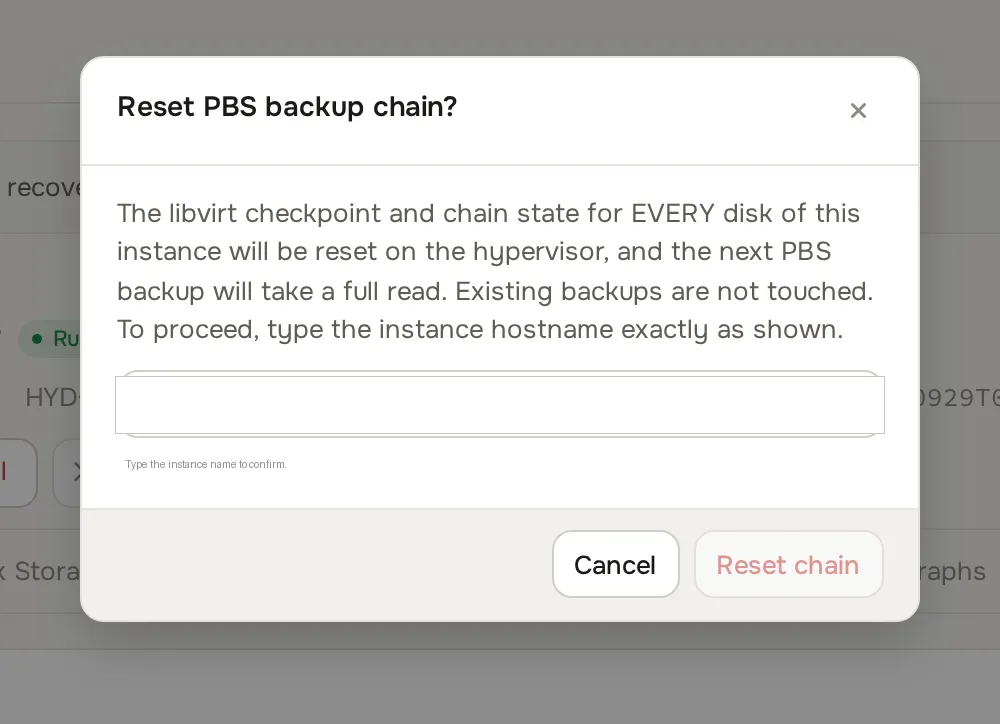
Chain reset applies to KVM instances only; a Proxmox VE guest’s incremental state belongs to Proxmox itself and has nothing for the platform to reset. If the hypervisor refuses the reset or cannot be reached, the panel reports the failure and leaves the existing chain state untouched.
Retention and protected snapshots
Section titled “Retention and protected snapshots”With panel-owned retention (the default), the hourly cleanup keeps each instance’s newest Retention count PBS snapshots and queues the rest for deletion on PBS. Deletion is asynchronous: a row counts as pruned only when the hypervisor confirms the snapshot is gone. A backup row can be flagged protected from the instance’s Backups tab, using the Protect / Unprotect control on each row; a protected row also carries a badge so it stands out in the list. Protection is enforced by the panel itself, everywhere retention and delete run, on every destination type, not only Proxmox Backup Server: a protected backup is skipped by the hourly retention cleanup and refused by the delete action until an admin unprotects it. This is separate from Proxmox Backup Server’s own prune and protection settings; the platform never reads or writes either of them, so protecting a backup here has no effect on PBS’s own retention, and PBS’s own protection state has no effect here. A protected backup must be unprotected before it can be deleted.
With PBS-managed retention on, the panel never deletes: configure prune jobs on PBS itself (per datastore or per namespace) and the panel only mirrors what remains.
Customers are billed on the logical size of their backups (the sum of archive sizes), never on PBS’s physical, post-dedup usage.
Verification, missing snapshots and usage
Section titled “Verification, missing snapshots and usage”An hourly reconcile job on the management server lists every PBS destination (through its hypervisors) and keeps the panel in sync:
- Verification state from PBS (
ok,failed, or not yet verified) is copied onto each backup row. A failed verification raises the same admin notification the existing backup verification flow uses. With Verify after backup on, each snapshot is also verified right after it is written. - Missing snapshots: a row whose snapshot no longer appears on PBS is not marked missing on the first absence. The first absence is recorded, and only a later listing at least an hour later that still lacks the snapshot confirms it as missing. A missing row is hidden from customers, excluded from restore pickers and from backup billing, shown to admins with a missing on PBS badge, and alerts the admin. If the snapshot reappears (for example after a PBS-side ACL fix), the row returns to normal automatically. A row confirmed missing is deleted only after it has been missing for 7 days, so the badge stays visible long enough to act on. As a safety tripwire, a reconcile run in which more than half of a destination’s rows read as absent confirms nothing at all, because that pattern means a connectivity or permissions problem, not 50 percent of snapshots genuinely vanishing.
- Orphaned snapshots (a snapshot on PBS with no matching row, which a lost completion report can leave behind) are counted and reported to the admin, never deleted automatically. PBS only tells the platform whether a Proxmox VE snapshot is present, not whether it is fully written, so orphan counting is skipped for any destination that has Proxmox VE snapshots on it; those snapshots are still checked for presence and verification state.
- Datastore usage (used and total bytes) is refreshed from PBS and shown on the destination, through one of the destination’s own KVM hypervisors. A namespace-scoped token can legitimately report zero usage; that reading is treated as unavailable and the last good values are kept. A destination used only by Proxmox VE clusters, with no KVM hypervisor attached to it, does not report usage.

Restores
Section titled “Restores”Restoring from a PBS destination works like any other restore from the instance’s Backups tab, with two differences worth knowing:
- Every snapshot is complete on its own, so a restore never rebuilds a chain of incrementals first.
- There is no wall-clock limit on a backup or restore transfer. Multi-terabyte disks run as long as they need; the only time-based failure is a stall, not a deadline. The stall window is 30 minutes by default on KVM hypervisors, and longer on Proxmox VE, whose own progress reporting only updates in coarse steps. Size bandwidth and concurrency against your PBS uplink instead of expecting transfers to fit a window.
- Restores share the same per-hypervisor backup concurrency limit as backups (below); a hypervisor already at its limit refuses a new restore rather than queuing behind it.
- On a backup covering more than one disk, restoring a single disk restores exactly the matching archive from that snapshot. If the target disk is too small for that archive, or the platform cannot resolve which archive belongs to the disk you picked, the restore is refused before anything is touched.
Restore to new instance (admin only) creates a brand-new instance from any PBS backup and restores every disk into it, including from a backup whose source instance has already been deleted. Open the instance’s Backups tab, choose the backup and use Restore to new instance. The target hypervisor must use the same backup destination the backup was taken on. Billing for the new instance follows the source instance’s billing mode: hourly-billed sources produce an hourly-billed instance, self-provisioning sources draw on the owner’s pack, and externally billed sources create no billing row (your billing system is not told). Restoring one customer’s backup into another customer’s account is an admin-only action by design.
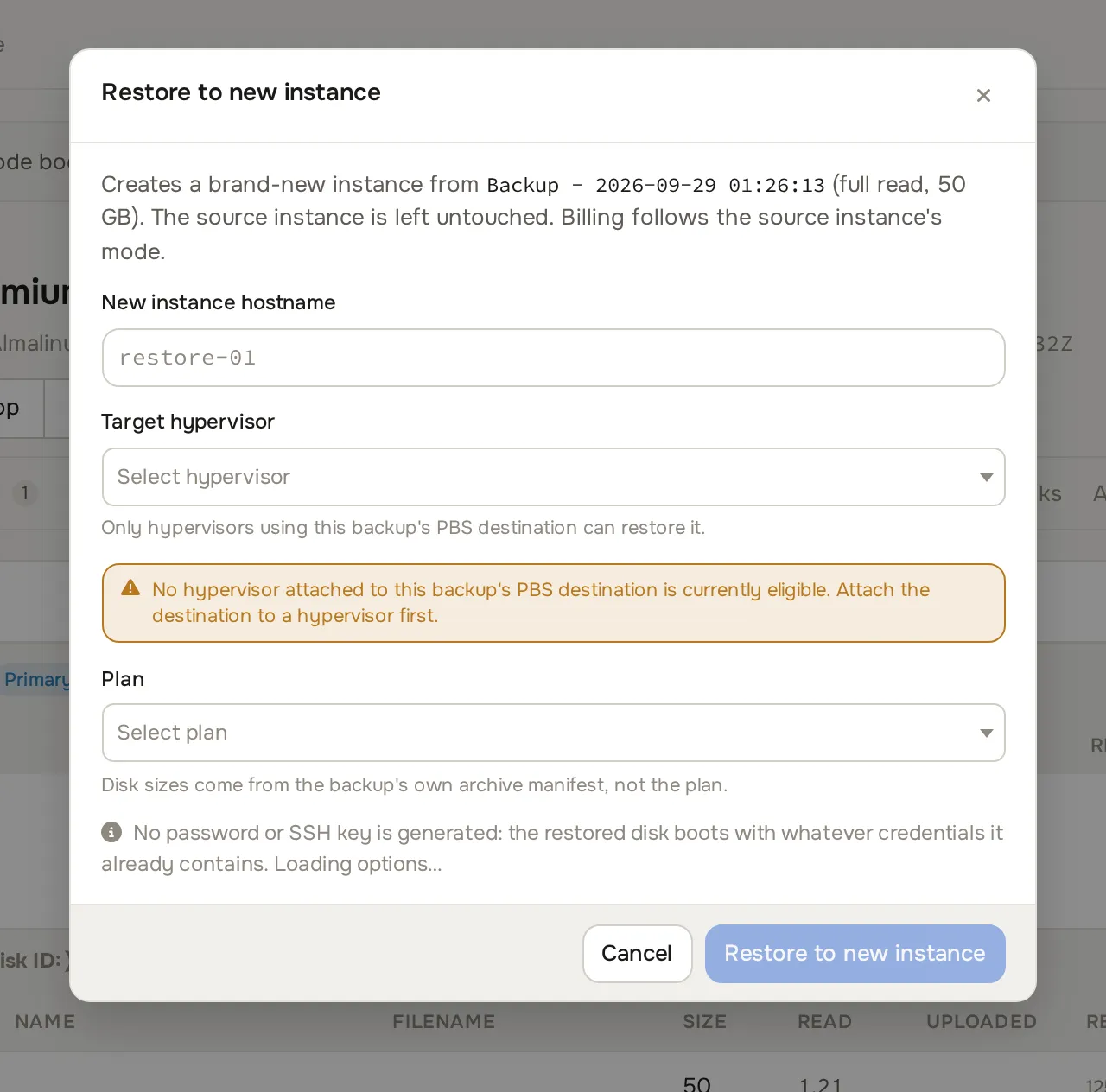
The new instance stays powered off until its final disk has been restored; it never boots a half-restored disk set.
Proxmox VE nodes
Section titled “Proxmox VE nodes”On Proxmox hypervisors the panel manages a PVE pbs storage entry per (destination, cluster) and backs up with vzdump in snapshot mode:
- The storage entry, its PBS namespace and its password file are created and kept in sync automatically. Rotating the token secret on the destination re-sends it to every cluster’s entry. Your PVE API token needs permission to manage storage configuration (
Datastore.Allocateon/storage) for this to work. - Bandwidth limits and IO priority are passed to vzdump when the PVE token holds
Sys.Modifyon/; without that privilege the backup still runs, at PVE’s defaults. - PVE dirty-bitmap incremental mode is used whenever the bitmap is reusable; the vzdump log’s dirty-bitmap status lines are parsed into the same read-mode and chain-reason fields KVM backups report.
- Retention stays with the panel (
remove=0on every vzdump call), so the same retention rules apply as on KVM. - Restoring a Proxmox guest stops it first if it is running, and PVE destroys the guest’s existing local snapshots as part of any restore, on any destination type. With Live restore enabled on the destination, the guest starts while its disks stream back.
Performance and concurrency
Section titled “Performance and concurrency”- Per-hypervisor backup concurrency (
1to16, default2) applies to PBS backups and restores alike. For PBS destinations keep it at8or below. - The destination’s Bandwidth Limit (Mbps) caps each transfer; size limit times concurrency against the PBS server’s uplink.
- IO Priority on the hypervisor’s Backup Configuration card applies to the PBS client too: Idle runs transfers at low CPU and IO priority so guests stay responsive.
- On a hypervisor with
systemd-runavailable, the PBS client runs under a 512 MB memory cap; a run that exceeds it fails on its own instead of taking the host down, and the next scheduled backup starts over normally.
Common problems
Section titled “Common problems”- Test connection fails with a permissions or
Datastore.Modifyerror. The token is missing theDatastoreAdmingrant, or only one principal was granted. Re-run bothacl updatecommands from step 3, one for the user and one for the token, and re-check withuser permissions. - The first backup for a new customer fails with a 403. Same cause: the token cannot create the per-customer child namespace because
Datastore.Modifyis missing on the root namespace. ADatastorePowerUsergrant is not enough; it has no Modify privilege. - Authentication fails after editing the destination. The token secret is bound to its own token ID. If you change Auth ID, paste the new token’s secret in the same save; the panel refuses an auth-id change without a new secret.
- Test connection fails with a fingerprint mismatch. The PBS certificate changed (reinstall or cert renewal). Fetch the new fingerprint with the helper, confirm it against
proxmox-backup-manager cert infoon the server, and save. - Datastore usage shows stale or zero values. A namespace-scoped token cannot always read datastore-wide usage; the panel keeps the last good reading in that case.
- A backup shows a full read where you expected an incremental. Check the row’s chain reason: resize, bitmap loss, migration, a cancelled previous run, a chain reset, and, on a KVM hypervisor, raw block storage (LVM/ZFS) all force a full re-read by design. The next run is incremental again, except on raw block storage, which is always full on KVM.
- Reset Chain fails. The hypervisor either refused the request or could not be reached; the panel names which. Existing chain state is left alone either way, so it is safe to try again once the hypervisor is healthy.
proxmox-backup-client benchmarkfails against the destination’s token. Expected: the benchmark command always runs at the datastore root and cannot be scoped to the token’s namespace. Do not widen the ACL to satisfy it; the panel’s own test connection is the connectivity proof.