

Disaster recovery
If a compute node dies, the instances that lived on it must come back on a replacement node. Two things make that possible:
- A nightly node config bundle, written to the node’s backup storage, which records the node’s identity, its instance definitions, network wiring and NAT rules.
- The instance backup chains, which hold a restorable copy of each instance’s disks.
Disaster recovery rebuilds those instances onto a replacement hypervisor: shared-storage guests are re-homed in place, and local-disk guests are recreated from their backup chains. The flow lives on the hypervisor page as Rebuild from backups and is available on the command line as hypervisor:rebuild.
The nightly node bundle
Section titled “The nightly node bundle”Every hypervisor agent bundles its recovery-critical configuration and writes it to the hypervisor’s backup storage. The bundle is what lets a freshly deployed replacement node rebuild the guests exactly, without depending on the dead node’s filesystem.
What is in the bundle
Section titled “What is in the bundle”| Member | What it is |
|---|---|
hypervisor.json |
Node identity, read back by the agent to resolve its own id. |
instances/{name}/instance.json |
Per-instance recovery snapshot: the defined VM, its resources and config. |
instances/{name}/interfaces.json |
Network wiring for that instance. |
instances/{name}/{name}.xml |
The libvirt domain XML. |
instances/{name}/{name}_VARS.fd |
The UEFI NVRAM store for the guest. |
nat/{name}.xml |
NAT definitions for the node. |
Together these are the ground-truth anchors for a rebuild. Instances that are still deploying or are not yet written to disk at bundle time simply have no member yet; the bundle is a point-in-time snapshot of the node’s config.
Where it is written and how long it is kept
Section titled “Where it is written and how long it is kept”The bundle is a single gzipped tar file written under the node’s backup storage:
- Container:
_node/{hypervisor_id}/ - File:
bundle-{Ymd-His}.tar.gz(for examplebundle-20260916-033000.tar.gz)
The container sits on whatever backup storage is assigned to the hypervisor: a local path ({path}/_node/{id}/), an S3 bucket under the storage’s path prefix, or an rclone remote. The agent keeps the newest 7 bundles and deletes anything older.
When it runs
Section titled “When it runs”- Nightly at 03:30 UTC the agent runs
node:bundleon its own schedule, self-serving the backup-storage config it persisted from the last on-demand trigger. - When backup storage is assigned or changed on the hypervisor, the management server calls the agent immediately to re-seed the bundle, so the persisted storage config is always current.
- After a hypervisor agent update (
vcli hypervisor:updateon the management server, orvcli app:updateon the node), the management server re-seeds the bundle so a fresh agent writes with the current config.
Rebuild a failed node from backups
Section titled “Rebuild a failed node from backups”When a node is down or fenced, its hypervisor page offers Rebuild from backups. The destination is a different, healthy hypervisor.
- Open the failed hypervisor (Infrastructure > Hypervisors), and click Rebuild from backups in the page header (it appears there whenever the node is down or fenced).
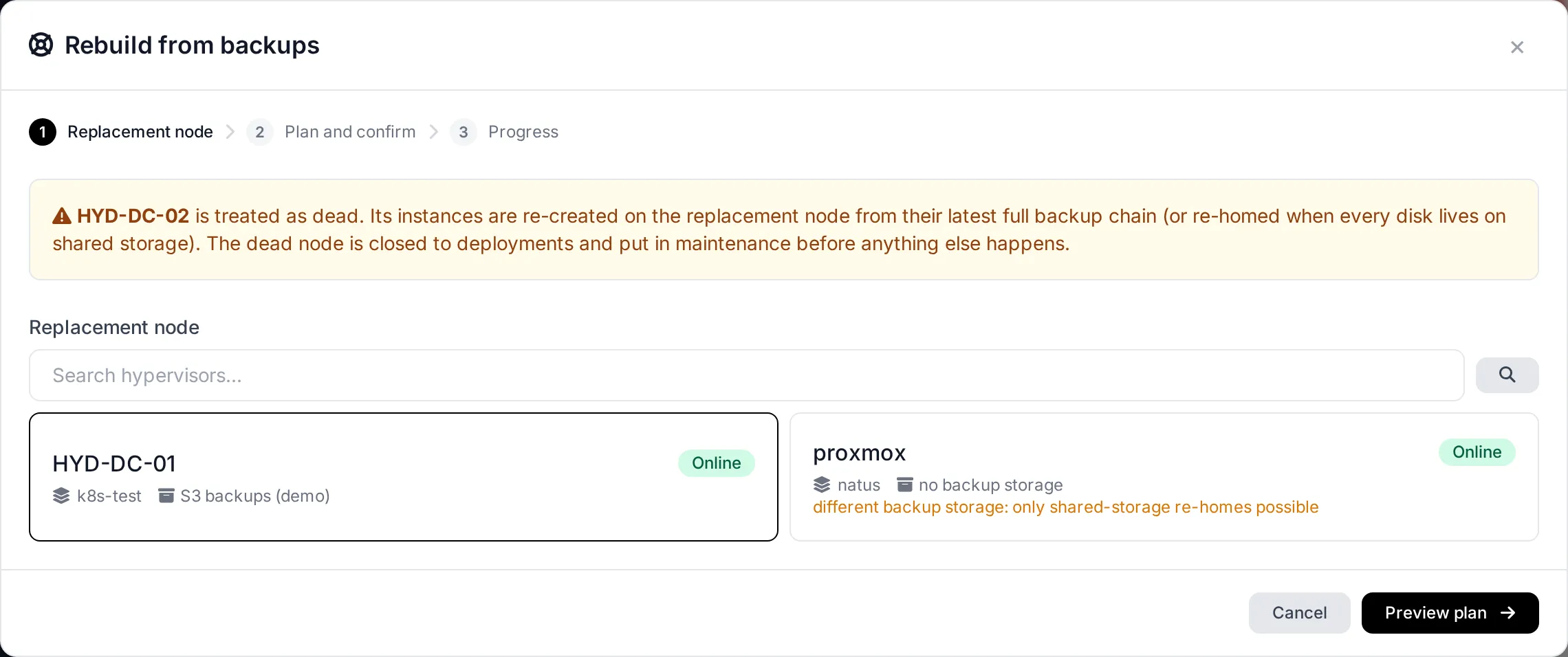
- Pick the target node. It must be a different hypervisor, online, and out of maintenance. A node cannot be rebuilt onto itself.
- Click Preview plan. The panel queries the failed node’s instances and classifies each one against the target, then shows a plan table.
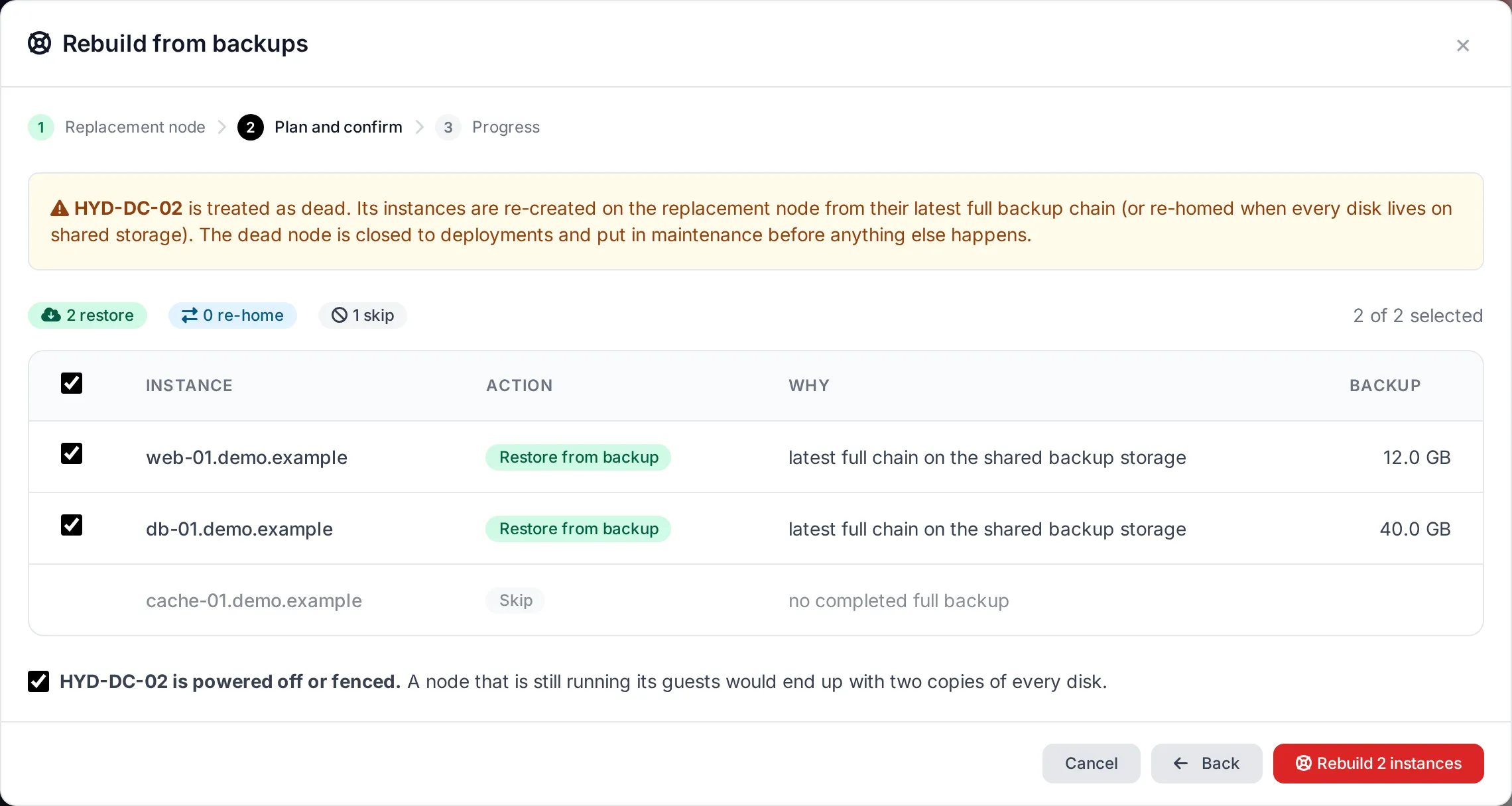
Each row lists the instance hostname, the proposed Action (Restore, Re-home or Skip), the Reason, and the backup size for a restore. The summary line totals how many instances will be restored, re-homed and skipped. Review it before running, because a restore replays backups over newly created disks.
How each instance is classified
Section titled “How each instance is classified”| Action | When it applies |
|---|---|
| Restore | The instance’s disks are on non-shared storage and it has a completed full backup on an S3 or rclone backup storage that is assigned to the target node. The empty disks are recreated on the target and the backup chain is replayed onto them. |
| Re-home | All of the instance’s disks are on shared storage that is already attached to the target node. The guest’s rows are repointed to the target and it is restarted there, with no data copy. |
| Skip | The instance cannot be rebuilt onto the target. See the skip reasons below. |
Why an instance is skipped
Section titled “Why an instance is skipped”| Reason | What it means in plain terms |
|---|---|
local_backup_storage |
The instance’s only restorable backup is on a local backup storage path that lives on the dead node itself, so it is unreachable from the target. Local backups cannot rebuild a dead node. |
no_backup |
The instance has no completed full backup to restore from. A restore needs at least one. |
storage_not_attached |
A shared-storage disk is not attached to the target node, or the backup that would be used is on a backup storage that is not assigned to the target node (or its storage record can no longer be found). Attach the needed storage and re-plan. |
mixed_disks |
The instance has a mix of shared-storage and non-shared disks. It cannot be recovered as a whole onto the target, because the non-shared disks have no restorable copy on that node. |
Run the rebuild
Section titled “Run the rebuild”The rebuild is destructive to the dead node’s role. Confirm the prerequisite, then run it. The management server handles every instance in the plan.
- Tick the node is powered off or fenced. This is required; the rebuild refuses to start without it.
- Optionally limit the run to a subset of instances by ticking the ones you want.
- Click Rebuild N instances (N is the number of ticked rows). The panel dispatches
hypervisor:rebuildas a background job and shows progress per instance from its tasks: re-homing rows, restoring each backup chain link, then starting the guest.
As it runs, the dead node is immediately marked allow deployment off and maintenance on, so it can never take new deployments again even if the rebuild is interrupted. The run is resumable: re-running it after a partial failure continues from the last incomplete instance.
Command line equivalent
Section titled “Command line equivalent”hypervisor:rebuild does the same thing without the panel:
php artisan hypervisor:rebuild --from=<dead-node-id> --onto=<replacement-node-id> [--instances=<id1,id2>] [--dry-run]--from: the dead hypervisor id.--onto: the replacement hypervisor id.--instances: comma-separated instance ids to limit the run to.--dry-run: print the plan and send nothing (the same preview the panel shows).
For example, to preview a rebuild before running it:
php artisan hypervisor:rebuild --from=8f3c… --onto=1a9e… --dry-runWhat the rebuild does not do
Section titled “What the rebuild does not do”The feature is a recovery path, not a general migration tool. Before relying on it, understand the limits:
- Local-only backups on a dead node cannot restore. A backup on a
localbackup storage on the failed node is unreachable. Only S3 and rclone backup storage assigned to the target node can restore disks (local_backup_storageandstorage_not_attachedin the plan). - Shared storage is required to re-home. Only guests whose disks are all on shared storage already attached to the target can be re-homed. A shared-storage deployment (for example Ceph RBD) is re-pointed without copying its data.
- Mixed-disk instances are skipped. An instance with both shared and non-shared disks is left out, because its local disks have no restorable copy on the replacement node.
- The source node stays undeployable. Once a rebuild starts, the dead node keeps
allow_deploymentoff andmaintenanceon. It is never re-enabled automatically. If the node comes back, bring it out of maintenance and allow deployments deliberately before using it again. - Restore replays a backup chain. A restore does not deploy from a template, run cloud-init, or start a fresh guest. It recreates the defined disks at their recorded size and replays the completed full backup plus its incrementals, so anything newer than the last full backup is lost unless it is in a completed link of the chain.
- The target must be healthy. The replacement node has to be online, out of maintenance, and a different node than the source. The plan preview refuses these cases.