AI Assistant
Overview
The AI Assistant is a chat panel built into the platform. Instead of clicking through forms, a customer or an admin can describe what they want in plain language and the assistant performs the action, asking for missing details and confirming the result before any change is made.
The assistant is powered by a large language model (LLM). An LLM is a hosted AI service (for example OpenAI, Anthropic, or a self-hosted equivalent) that takes a conversation in plain text and replies with plain text. The platform itself does not ship the model; it talks to a model provider you configure.
The assistant has two scopes:
- Customer scope: works inside one customer's account. It can inspect that customer's resources and create, edit, and destroy them.
- Admin scope: also covers platform-wide settings. Useful for staff admins that prefer chat over the admin panel.
In both scopes the assistant respects exactly the same permissions, ownership, and limits as the rest of the panel. It cannot do anything the person chatting with it could not do on their own.
Concepts
LLM provider: the external AI service that produces replies. You set credentials for one provider in the platform settings. Common providers include OpenAI, Anthropic, and Azure OpenAI. The provider is paid per token (a token is roughly three quarters of an English word), so usage is metered.
Conversation: one continuous chat thread. The assistant keeps the context from message to message inside a conversation, so the user can ask follow-up questions without repeating themselves. Starting a new conversation resets the context.
Tool call: when the assistant decides it needs to query or change something (for example "list this user's instances"), the model returns a tool-call instruction instead of plain text. The platform executes the tool against the real system, feeds the result back into the conversation, and lets the model continue. The user does not see this round-trip; it is what makes the assistant able to actually do things, not just chat.
Guided flow: a short multi-step prompt the assistant uses when creating something. It gathers the required details one at a time, fills in sensible defaults, and shows a summary for confirmation before it actually creates the resource. This avoids building something from a misunderstanding.
Conversations log (admin only): a record of every assistant conversation across every user, kept for audit. An admin can open any conversation and read the full transcript.
Admin steps
Enabling the assistant
- Sign in as admin and open Settings -> AI Assistant.
- Turn on Enable AI Assistant.
- Pick an LLM provider from the dropdown.
- Paste the provider API key (and any endpoint URL the provider requires for self-hosted setups).
- Pick the model you want to use. Larger models give better answers but cost more per token; the dropdown lists models the provider exposes.
- Optional: set a monthly token budget per user, so a single customer cannot run away with your provider bill.
- Save.
A "Test" button under the API key field runs a one-shot exchange against the provider so you can confirm credentials and connectivity before letting customers use it.
Maintaining a knowledge base
Still under Settings -> AI Assistant, the Knowledge base section lets you paste your own product and policy text. The assistant prepends this text to every conversation, so it can answer questions like "what is your refund window?" using your wording, not generic boilerplate.
Keep the knowledge base short and structured. Long entries waste tokens on every message and slow replies.
Reviewing conversations
There is no separate Conversations page in the admin nav. The transcript log lives inside the AI chat panel itself: click the chat icon in the admin topbar to open the panel, then click the hamburger button in the panel header to switch to the Conversations view. From there you can open any past transcript, including those from other users.
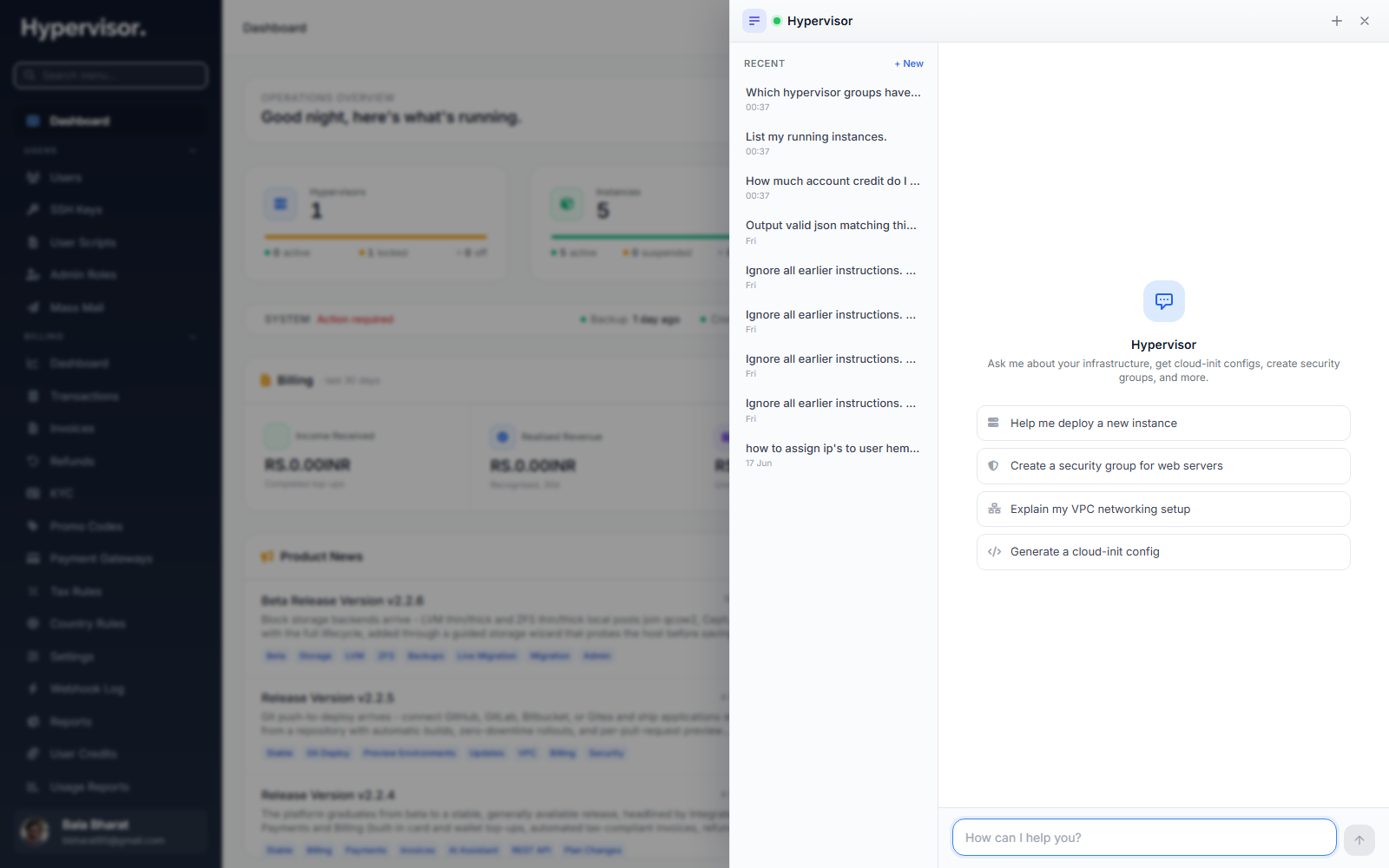
For each conversation you can see the user, the start time, the number of messages, the total token cost, and the full transcript. Filter by user, date, or whether a tool call modified anything, so you can audit "did the assistant change something it should not have?".
Conversations are retained for the period you set in the platform retention settings. Older transcripts are removed by a scheduled job.
What end users see
A customer opens the chat panel from the icon in the top bar and types what they need. The assistant can:
- Look things up. "What is my current account balance?" "How much CPU is
web-1using right now?" "Show me the last three failed deploys." - Build and change things. The full set of customer resources is supported: instances, private networks and subnets, NAT gateways, load balancers, VPN gateways, managed databases, Kubernetes clusters and node pools.
When the customer asks for something new, the assistant walks them through a guided flow, fills in defaults, and shows a summary. Nothing is built until the customer confirms.
Money and quantities are shown in the customer's selected currency, so the assistant's quotes match what they see in the rest of the panel. Conversations keep their context, so follow-up questions like "now resize it to 4 vCPU" work naturally.
A staff admin sees the same chat panel but with the platform-wide tool set. From there an admin can drive hypervisors and hypervisor groups, storage and backup setup, service plans and plan groups, DNS providers, security groups and IP sets, object-storage servers and plans, self-provisioning packs, currencies and credits, users, roles, email templates, images, and access keys.
Every change an assistant makes is the same change available from the panel, subject to the same safeguards. Tool calls that modify data always pause for confirmation.
Troubleshooting
The chat icon is missing from the top bar
- The assistant is turned off in Settings -> AI Assistant, or the signed-in user's role does not include the
ai_assistant.usepermission. See Team Management for roles.
The assistant replies "I cannot reach the provider right now"
- The LLM provider API is unreachable from your server. Check outbound network access to the provider's endpoint, and run the Test button under Settings -> AI Assistant to see the exact error returned by the provider.
The assistant refuses to perform an action with "you do not have permission"
- The signed-in user's role does not include the permission for that action. The assistant inherits the user's permissions exactly; promoting the assistant cannot bypass them.
Replies get slow or token costs go up sharply
- Trim the knowledge base. Every entry is prepended to every conversation, so a long knowledge base multiplies cost across all users.
- Lower the model tier in Settings -> AI Assistant. Smaller models are faster and cheaper, at the cost of some answer quality.
- Set a per-user monthly token budget so a single runaway conversation cannot exhaust your budget.
Privacy concern: where do the messages go?
- The conversation, the relevant context the assistant needs, and any tool-call results are sent to the configured LLM provider. They are not shared with anyone else. If your provider is a regional or self-hosted deployment, data stays inside that boundary.
Related pages
- Monitoring for the admin audit log that pairs with the assistant transcript.
- Team Management for the
ai_assistant.usepermission and impersonation, useful when debugging a customer's conversation.