Licensing Overview
Overview
Hypervisor is licensed per management server. You buy one license for the Master panel, and the license carries one or more addons that determine how many physical or virtual KVM hosts ("hypervisors") you are allowed to connect, and how many virtual machines (VMs) each of those hosts can run.
Licenses are issued from https://service.readydedis.com/ and can be updated at any time. Adding more addons takes effect as soon as the license is refreshed in the panel.
Concepts
- Management server is the Master panel. One license covers exactly one management server.
- Hypervisor is a physical or virtual KVM host that runs your customer VMs. It connects to the management server using the Slave agent.
- VM (Virtual Machine) is a single customer instance running on a hypervisor.
- Addon is a slot on your license that authorises one hypervisor with a specific per-host VM cap. Each addon corresponds to one hypervisor you connect.
- VM limit is the maximum number of VMs that a single hypervisor can run. The per-host limit comes from the addon attached to it.
Available addons
The platform offers four addon tiers. Each represents one hypervisor slot:
| Addon | What it means |
|---|---|
| Unlimited VM Hypervisor | No cap on how many VMs this hypervisor can run. |
| 10 VM Hypervisor | Up to 10 VMs on this hypervisor. |
| 5 VM Hypervisor | Up to 5 VMs on this hypervisor. |
| 1 VM Hypervisor | A single VM on this hypervisor. Useful for dedicated-server-like products. |
Example license composition
A single license could include:
- 20 x Unlimited VM Hypervisors
- 10 x 1 VM Hypervisors
- 2 x 10 VM Hypervisors
- 1 x 5 VM Hypervisor
That means you can connect:
- 20 hypervisors with no VM cap each,
- 10 hypervisors limited to 1 VM each,
- 2 hypervisors capped at 10 VMs each,
- 1 hypervisor capped at 5 VMs.
Totalling 33 connected hypervisors on this one management server.
Admin steps
Activate or refresh your license
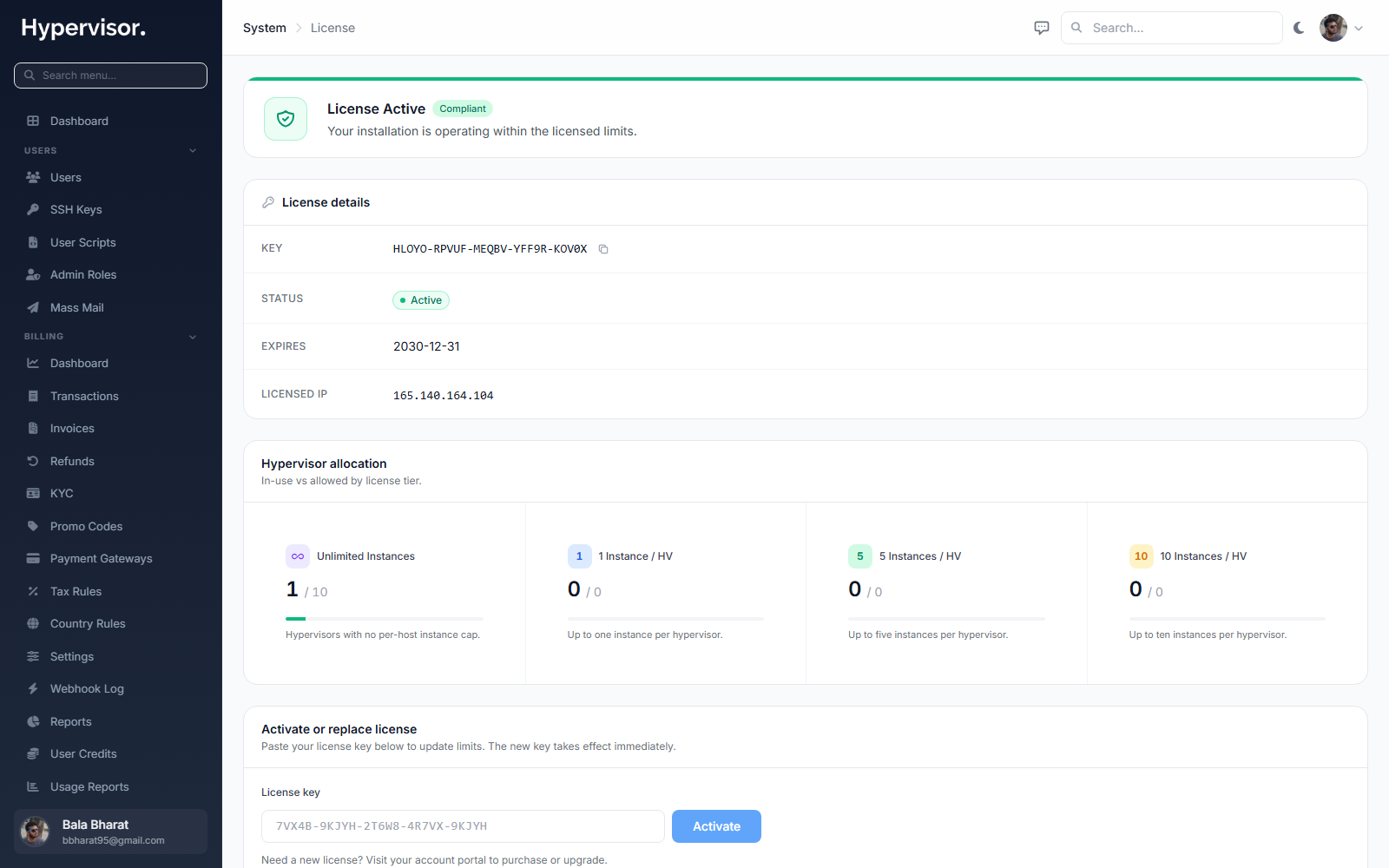
Go to the License page in the admin panel.
- Buy or update your license at https://service.readydedis.com/.
- Copy the license key.
- Paste it into the License page and save. The panel reads back your active addons and shows your VM limits per hypervisor.
Upgrade later
Need more capacity? Buy more addons on the licensing portal, then come back to this page and refresh. The new limits apply immediately.
How it works in practice
- Purchase a license (or start with a trial).
- Add hypervisor addons based on how many hypervisors you want to connect and how big each should be.
- Connect hypervisors through the admin panel. Each connection consumes one addon slot from your license.
- Upgrade anytime. Add more addons whenever you need more capacity.