Hetzner Bridge Network Configuration
Setting up Bridge
When you order a server from hetzner ( Auction / Normal ) the following would be the state assuming you have only purchased an additional IP and not a subnet
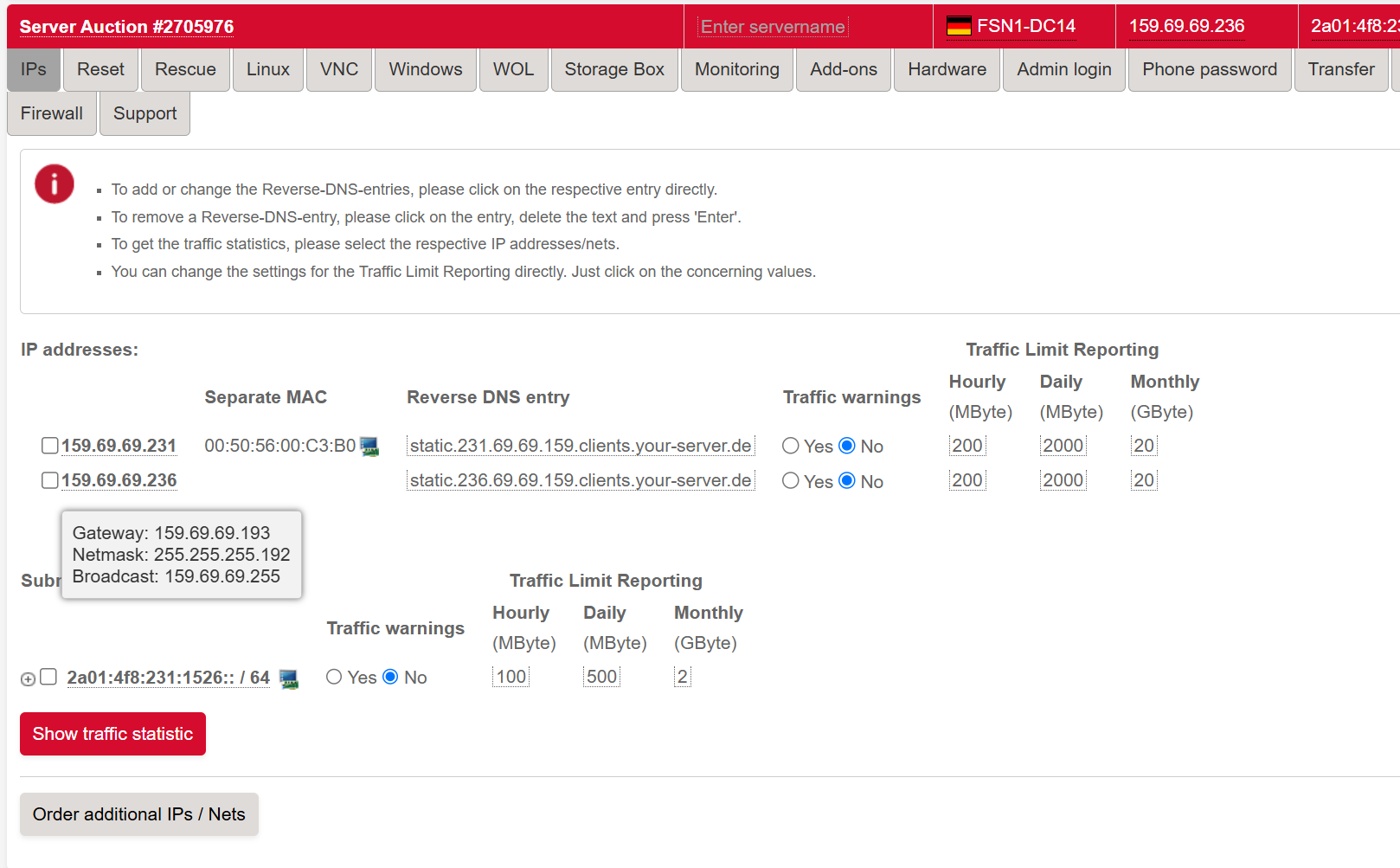
Hetzner-specific facts
These apply to every example below. The values come from Hetzner's official network docs:
- Bridge name:
br0. Do not name your bridgevirbr0; that name is reserved by libvirt for its default NAT network and the two will collide. - Bridge MAC must match the physical NIC's MAC. Hetzner's switch ports have strict IP/MAC binding. A bridge with a random MAC is silently filtered out by the upstream switch.
- IPv4: the additional IP / main IP is configured with a
/32netmask plus anon-linkroute to the gateway. Hetzner's gateway sits outside your/32, so theon-linkflag is what tells Linux it is still directly reachable. - IPv6 gateway:
fe80::1(link-local). Routes useon-link: truefor the same reason. - Hetzner DNS:
185.12.64.1,185.12.64.2(IPv4) and2a01:4ff:ff00::add:1,2a01:4ff:ff00::add:2(IPv6). Replace stray8.8.8.8references in older configs. - Interface name in the examples (
enp0s31f6) is just an example. Find your real one withip route | grep default; substitute that name everywhere. - Virtual MACs. When you assign an additional single IP to a guest VM, generate a Virtual MAC from Robot for that IP and assign it to the guest's NIC. Without it Hetzner filters guest traffic.
Bridge Mode
- Debian 11.x / 12.x / 13.x
- RHEL 9 / 10
- Ubuntu 22.04 / 24.04 / 26.04
The following file contains the default network configuration on a default installation of Debian on Hetzner.
nano /etc/network/interfaces
### Hetzner Online GmbH installimage
source /etc/network/interfaces.d/*

auto lo
iface lo inet loopback
iface lo inet6 loopback

auto enp0s31f6
iface enp0s31f6 inet static
address 159.69.69.236
netmask 255.255.255.192
gateway 159.69.69.193
# route 159.69.69.192/26 via 159.69.69.193
up route add -net 159.69.69.192 netmask 255.255.255.192 gw 159.69.69.193 dev enp0s31f6

iface enp0s31f6 inet6 static
address 2a01:4f8:231:1526::2
netmask 64
gateway fe80::1
With the above as the starting point, replace it with the bridge configuration below.
### Hetzner Online GmbH installimage
source /etc/network/interfaces.d/*

auto lo
iface lo inet loopback
iface lo inet6 loopback

# Physical interface - no IP, no auto-bring-up of its own
auto enp0s31f6
iface enp0s31f6 inet manual

# Bridge - same MAC as the physical NIC
auto br0
iface br0 inet static
address 159.69.69.236
netmask 255.255.255.255
gateway 159.69.69.193
pointopoint 159.69.69.193
hwaddress ether 90:1b:0e:f1:70:66
dns-nameservers 185.12.64.1 185.12.64.2
bridge_ports enp0s31f6
bridge_stp off
bridge_fd 0
bridge_maxwait 0

iface br0 inet6 static
address 2a01:4f8:231:1526::2
netmask 64
gateway fe80::1
bridge_ports enp0s31f6
bridge_stp off
bridge_fd 0
bridge_maxwait 1
The pointopoint directive on Debian's ifupdown is what implements the same trick as netplan's on-link: true: it tells Debian the gateway is directly reachable even though it is outside the /32.
Running nmcli connection show will show you the interfaces present on your system.
To read the MAC address of the physical NIC:
nmcli connection show "enp0s31f6" | grep mac-address
802-3-ethernet.mac-address:                             90:1b:0e:f1:70:66
802-3-ethernet.cloned-mac-address:                      --
802-3-ethernet.generate-mac-address-mask:               --
802-3-ethernet.mac-address-denylist:                    --
802-3-ethernet.accept-all-mac-addresses:-1              (default)
The following commands create the bridge on RHEL 9 or RHEL 10 (also Rocky 9/10, AlmaLinux 9/10). The cloned-mac-address line is what matches the bridge MAC to the physical NIC's MAC, which Hetzner requires.
nmcli connection add type bridge con-name br0 ifname br0
nmcli connection modify br0 ipv4.addresses '159.69.69.236/32' ipv4.gateway '159.69.69.193' ipv4.dns '185.12.64.1 185.12.64.2' ipv4.method manual
nmcli connection modify br0 ipv6.addresses '2a01:4f8:231:1526::2/64' ipv6.gateway 'fe80::1' ipv6.dns '2a01:4ff:ff00::add:1 2a01:4ff:ff00::add:2' ipv6.method manual
nmcli connection modify enp0s31f6 master br0
nmcli connection modify br0 connection.autoconnect-slaves 1
nmcli connection modify br0 ethernet.cloned-mac-address 90:1b:0e:f1:70:66
nmcli connection up br0 && nmcli connection up enp0s31f6
The following file contains the default network configuration on a default Ubuntu installation on Hetzner.
nano /etc/netplan/01-netcfg.yaml
### Hetzner Online GmbH installimage
network:
  version: 2
  renderer: networkd
  ethernets:
    enp0s31f6:
      addresses:
        - 159.69.69.236/32
        - 2a01:4f8:231:1526::2/64
      routes:
        - on-link: true
          to: 0.0.0.0/0
          via: 159.69.69.193
        - to: default
          via: fe80::1
      nameservers:
        addresses:
          - 185.12.64.1
          - 2a01:4ff:ff00::add:2
          - 185.12.64.2
          - 2a01:4ff:ff00::add:1
Replace it with the bridged configuration:
### Hetzner Online GmbH installimage
network:
  version: 2
  renderer: networkd
  ethernets:
    enp0s31f6:
      match:
        macaddress: 90:1b:0e:f1:70:66
      dhcp4: no
      dhcp6: no
  bridges:
    br0:
      macaddress: 90:1b:0e:f1:70:66
      interfaces:
        - enp0s31f6
      dhcp4: no
      dhcp6: no
      addresses:
        - 159.69.69.236/32
        - 2a01:4f8:231:1526::2/64
      routes:
        - to: 0.0.0.0/0
          via: 159.69.69.193
          on-link: true
        - to: "::/0"
          via: "fe80::1"
          on-link: true
      nameservers:
        addresses:
          - 185.12.64.1
          - 2a01:4ff:ff00::add:2
          - 185.12.64.2
          - 2a01:4ff:ff00::add:1
Notes on the bridge block:
- The
macaddressonbr0matches the physical NIC. Hetzner's switch enforces this. - IPv4 is
/32withon-link: truebecause Hetzner's gateway sits outside the host's/32. - The IPv6 default route is
::/0via the link-localfe80::1, alsoon-link: true.
Apply with:
netplan apply
Please perform a reboot to confirm if everything works as expected, incase of any difficulties please reach out to our support.